Last Updated on April 4, 2026
Why do so many products fail even before they reach users – despite months of development?
In many cases, teams build full systems based on assumptions instead of testing ideas early. Features get developed, interfaces get polished, and engineering effort scales – only to discover that users struggle with navigation, ignore key features, or abandon the product entirely.
This is where prototypes in product development change the outcome.
Instead of committing resources upfront, teams create early versions of a product to:
- test how users interact with it
- validate whether core features solve real problems
- identify technical and usability gaps before scaling
Companies that adopt structured validation workflows reduce rework and improve delivery efficiency. Early-stage modeling is not just a design activity-it directly impacts cost, timelines, and product success.
What is a Prototype in Product Development?
A prototype in product development is a simplified version of a product used to test ideas, validate functionality, and evaluate user interaction before full-scale development.
Why teams build early versions before development
Building a full product without validation often leads to rework, delays, and wasted budget. Early models solve this by allowing teams to test assumptions before committing resources.
- Product teams test core features before engineering investment
- Designers validate user flows before interface development
- Engineers assess technical feasibility early
A report by the McKinsey Global Institute estimates that digital and AI-driven workflows can unlock up to $4.4 trillion annually in productivity gains, much of which depends on early validation and iteration. [source]
What problems prototypes actually solve
Instead of guessing what users need, prototypes create a controlled way to test decisions.
They help reduce:
- Feature failure risk → prevents building unused functionality
- Usability issues → identifies friction in navigation and interaction
- Development waste → avoids costly changes after launch
- Stakeholder misalignment → provides a shared visual reference
Now that the role of prototypes is clear, the bigger question is: 👉 What actually happens when teams skip prototyping?
Why Do Products Fail Without Prototyping?
Most products don’t fail because of bad code—they fail because the right problems were never validated early.
When teams skip prototyping, they move straight from idea to development. This creates a gap between what is assumed and what users actually need.
The Core Problem: Assumptions Replace Validation
Without prototypes, decisions are based on:
- Internal opinions instead of user behavior
- Static requirements instead of tested flows
- Visual imagination instead of real interaction
This leads to building features that:
- Users don’t understand
- Users don’t need
- Users won’t pay for
What Data Shows About Product Failures
Research across product development consistently highlights a few dominant reasons:
- ~34% of startups fail due to poor product-market fit [source]
- ~22% fail because of usability and UX issues [source]
- Many products require major redesigns post-launch, increasing cost and delays [source]
These are not engineering problems—they are validation failures, which prototyping is designed to prevent.
What Actually Goes Wrong Without Prototyping
- Misaligned User Experience: Teams build flows based on assumptions. Users struggle, drop off, or abandon the product.
- Expensive Rework: Fixing issues after development can cost 5–10x more than fixing them during the design stage.
- Stakeholder Miscommunication: Design, product, and engineering teams interpret requirements differently. Without a prototype, there’s no shared reference point.
- Delayed Time-to-Market: Iterations happen late instead of early, slowing down launches.
- Feature Overload (or Missing Core Features): Teams either overbuild unnecessary features or miss critical user needs.
What Prototyping Solves
Prototyping shifts validation earlier in the process:
- Ideas → Tested before development
- UX → Observed, not assumed
- Feedback → Collected before scaling
- Risks → Identified early
If you’re planning product development, it’s also useful to understand how prototyping fits into MVP strategy: (see: what is MVP in software development)
Now that it’s clear why skipping prototyping leads to failure, the next logical step is: Which type of prototype should you actually use for your product?
Which Prototype Should You Use? (Decision Matrix)
Choosing the wrong prototype is just as risky as skipping prototyping altogether.
Different stages of product development require different levels of fidelity, detail, and functionality. The goal is not to build the most advanced prototype—but the right one for the decision you need to make.
Quick Decision Matrix
| Goal | Recommended Prototype | Why It Works |
| Validate idea quickly | Low-fidelity (sketch/wireframe) | Fast, cheap, and easy to iterate |
| Test user flows | Clickable prototype | Simulates real interaction |
| Validate UI/UX design | High-fidelity prototype | Shows near-final experience |
| Test technical feasibility | Functional prototype | Validates backend logic |
| Pitch to investors/stakeholders | High-fidelity / interactive demo | Creates clarity and confidence |
| Pre-development alignment | Mid to high-fidelity prototype | Ensures team clarity before build |
How to Think About It (Simple Rule)
Instead of asking: “Which prototype is best?”
Ask: “What decision am I trying to make?”
Because:
- Early stage → speed matters more than accuracy
- Mid stage → usability matters
- Late stage → precision and realism matter
Example Scenarios
- If you’re at idea stage: Use wireframes or sketches → Focus on structure, not design
- If you’re testing user journeys: Use clickable prototypes (Figma, Adobe XD) → Focus on interaction
- If you’re preparing for development: Use high-fidelity prototypes → Focus on UI, states, and edge cases
- If you’re validating backend logic: Use functional prototypes or MVP builds → Focus on system behavior
If you want to understand how clickable prototypes are created in real workflows: (see: figma clickable prototype)
Key Insight
The best prototype is not the most detailed one—it’s the one that helps you learn fastest with the least effort.
Now that you know how to choose the right prototype, let’s break down: What are the actual types of prototypes used in product design?
The 14 Different Types of Product Prototypes
Before jumping into individual types, it helps to understand how these prototypes are grouped.
Prototypes aren’t random—they follow a natural validation journey. Each category answers a different question as you move from idea to real product:
- Is the idea valid? → Concept
- Will users understand it? → Experience
- Will it work technically? → Functionality
- Do users actually want it? → Feedback
- Does it work in real life? → Physical validation
This is why the 14 types are grouped into five categories below.
Category 1 – Concept & Feasibility Prototypes
At the very beginning, you need to answer one simple question—does this idea even make sense to build? These prototypes help you test the concept quickly and avoid wasting time on something that won’t work.
1. Feasibility Prototype Technique for Product Development
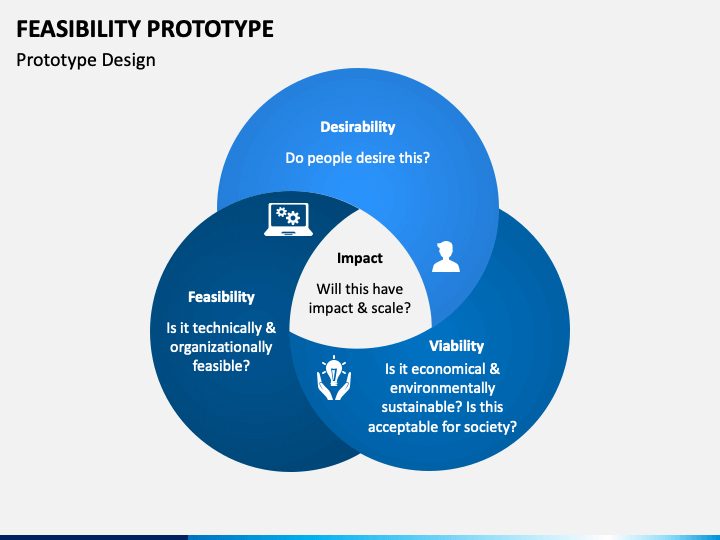
It is used to test the viability of a product concept and determine if it is technically feasible to produce. This type of prototype helps designers and developers identify any potential issues early on in the process, allowing them to make changes and improvements before committing to full-scale production.
Purpose of Feasibility Prototype
- Concept Validation: The feasibility prototype aims to validate the technical and functional feasibility of a project or product idea before committing to full-scale development
- Risk Assessment: It helps identify potential risks, challenges, and limitations early in the development process
- Proof of Concept: The prototype demonstrates key functionalities and interactions, proving that the core concept can be realized effectively
- Stakeholder Communication: It facilitates clear communication with stakeholders by providing a tangible representation of the idea
- Resource Allocation: The prototype aids in allocating resources, time, and budget appropriately by revealing potential complexities or cost implications
Example of Feasibility Prototype:
- Project: Developing a Smart Home Energy Management System
- Objective: To create a system that optimizes energy usage in a smart home environment
2. Sketches and Diagrams For Prototyping Process
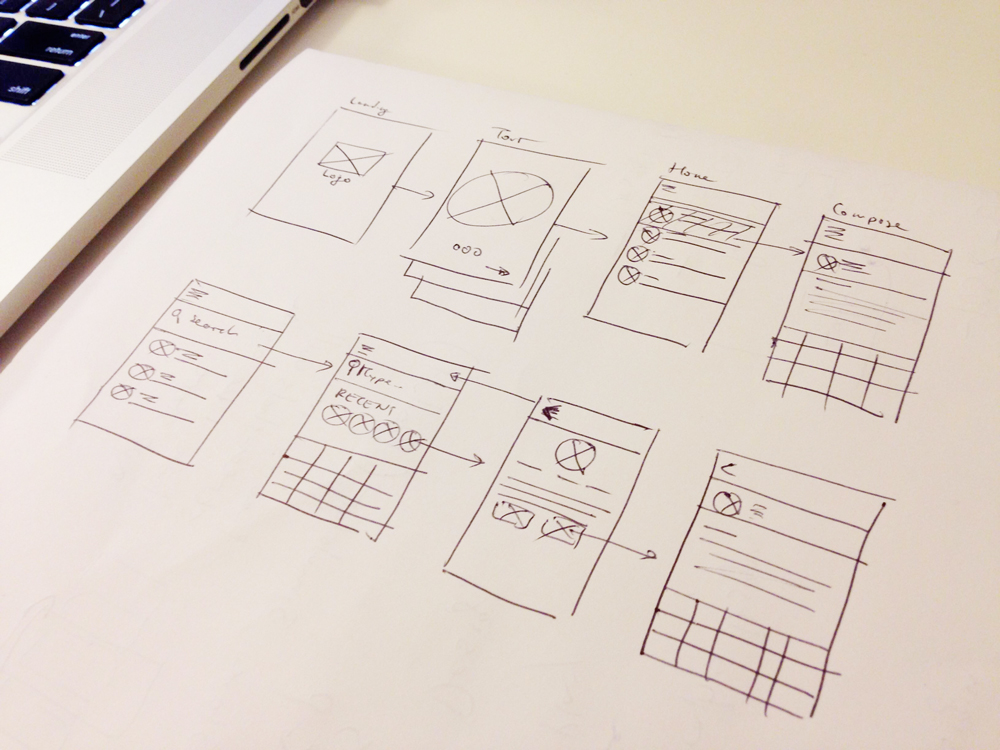
Sketches and diagrams are some of the earliest forms of prototypes used in product development. They are used to quickly and easily communicate design concepts and ideas to stakeholders, helping to identify any potential design issues early on in the process.
This type of prototype is usually created using pencil and paper, or digital tools such as Sketch or Figma.
Purpose of Sketches and Diagrams
- Idea Generation and Exploration – to quickly generate and explore various design ideas
- Communication and Collaboration – easier to understand and share than complex verbal
- Concept Validation – – allows you to test and validate design concepts with users or stakeholders
- Problem Solving – By visualizing different scenarios and solutions, you can better analyze and address design issues
Examples
- Wireframes – Wireframes are basic, low-fidelity sketches or diagrams that outline the layout and structure of a user interface
- Flowcharts – Flowcharts use symbols and arrows to represent the sequence of steps or interactions in a process. They’re commonly used to illustrate user workflows, decision trees, or system logic
- Mind Maps – Mind maps are visual diagrams that represent ideas or concepts linked together in a hierarchical or interconnected manner
- User Flows – User flows visually depict the paths users take to achieve specific goals within an application or website
Category 2 – Experience & Interaction Prototypes
Once the idea looks solid, the next step is understanding how users will interact with it. These prototypes help you see if users can navigate smoothly or if they get confused along the way.
3. Storyboard Prototype in UX/ UI Design
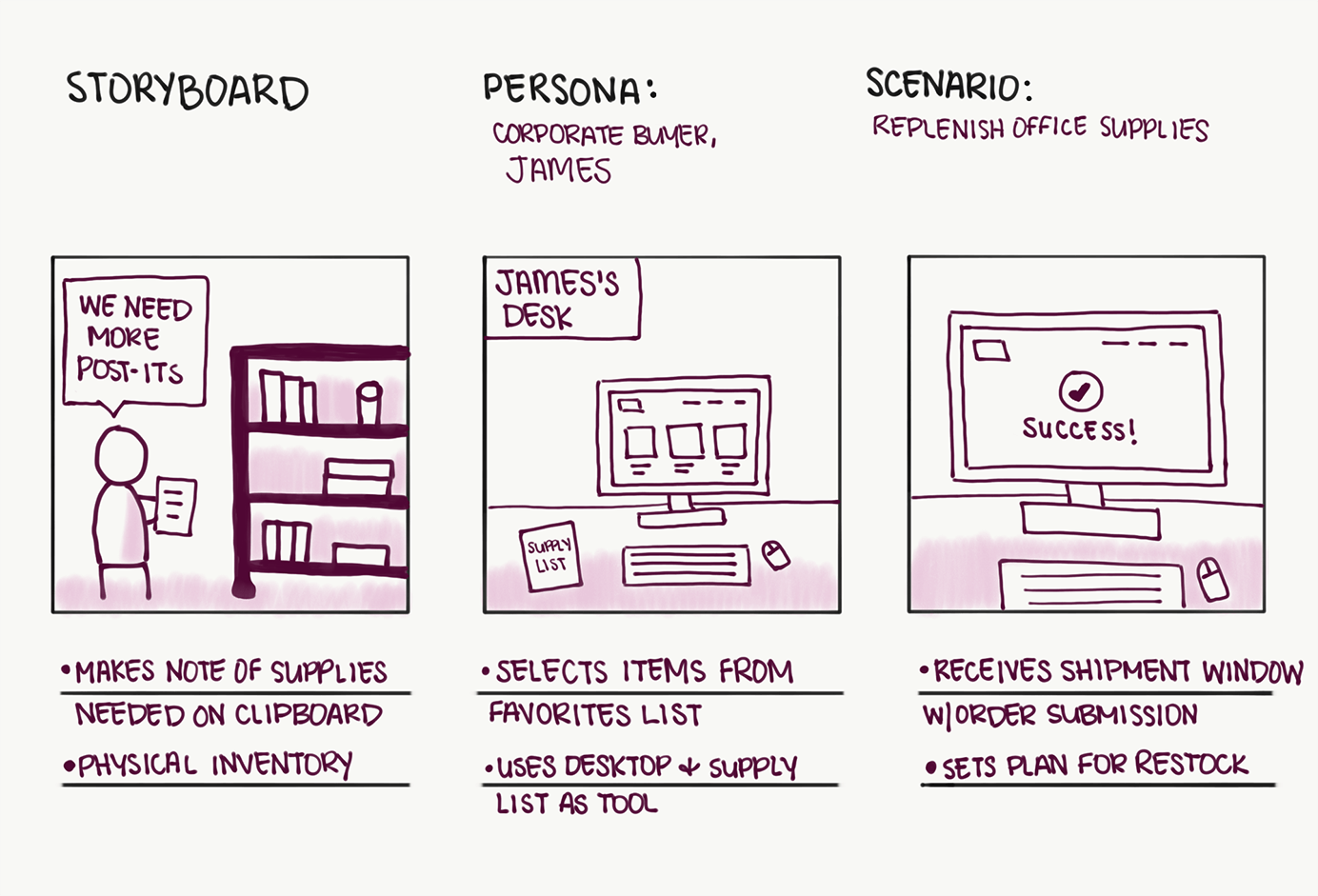
Storyboards are visual representations of the product’s design and user experience. This type of prototype can be used to test different design scenarios and to understand how a product might function in different contexts.
Storyboards are used to visualize the product’s user journey and to help designers and developers understand how users will interact with the product. They are often used in combination with other prototypes, such as sketches and diagrams, to provide a complete picture of the product’s design and functionality.
Purpose of Storyboard Prototype Model
- Visualization: This Model is used to visually represent the flow and interactions of a user interface or product
- User Experience Testing: It helps designers and stakeholders understand the user experience early in the design process
- Iterative Design: Storyboard prototypes support an iterative design approach
Example of Storyboard Prototype Model (E-commerce App)
Scenario: Designing a mobile e-commerce app for purchasing electronic gadgets
- User Introduction: Introduce the user, “Sarah,” who is tech-savvy and looking for a new smartphone.
- Home Screen: Show Sarah opening the app, greeted with a visually appealing home screen displaying featured gadgets.
- Product Exploration: Sarah taps on a smartphone, leading to a sequence of screens: product details, images, specifications, and customer reviews.
- Add to Cart: Sarah decides to purchase the smartphone. She taps “Add to Cart,” and the storyboard depicts the cart icon updating with the item count.
- Cart Review: Show Sarah navigating to the cart, viewing the added item, and proceeding to checkout.
- Checkout Process: Illustrate the step-by-step process of entering shipping details, selecting payment method, and confirming the order.
- Order Confirmation: Display an order confirmation screen with a summary of the purchase and a “Track Order” button.
- Post-Purchase: Depict Sarah receiving an email and push notification confirming her order, along with estimated delivery time.
- Feedback Prompt: Show Sarah receiving a prompt to rate her shopping experience. She taps on the stars to rate and submits her feedback.
- Appreciation: Conclude the storyboard with a happy Sarah receiving her order, unboxing the smartphone, and using it with a satisfied smile.
4. Mock-up Prototype
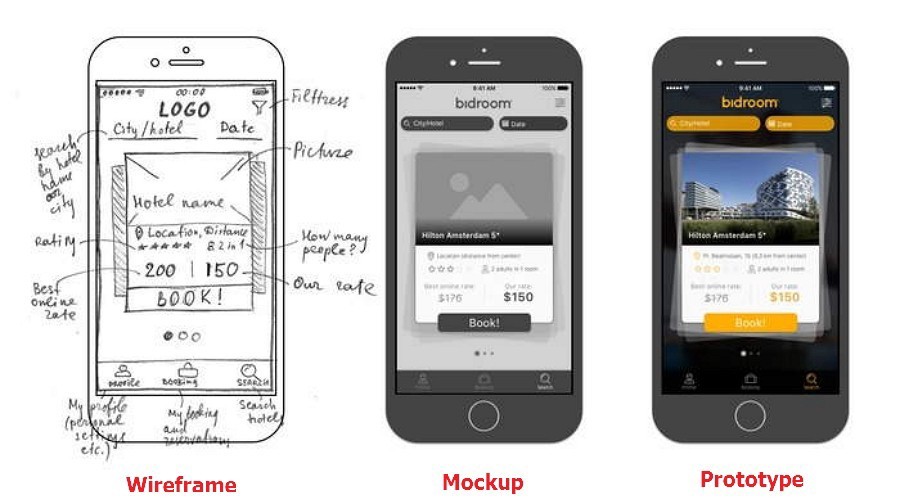
Mock-up prototypes are widely used to communicate the overall look and feel of a product to stakeholders. They are typically created early in the development process and allow designers and developers to quickly test and refine their design concepts without the need for extensive technical expertise or resources.
With a mock-up prototype, teams can quickly assess the usability of the product, gather feedback from stakeholders, and make changes as needed to improve the overall design.
Purpose of Mock-up Prototype Model
- Concept Visualization: It is used to visually represent the concept, layout, and design of a product or system before it is fully developed.
- Clarifying Design Intent: It helps in clarifying and communicating the design intent to stakeholders, including clients, designers, developers, and users.
- Feedback Collection: Mock-up prototypes allow for early feedback collection, enabling iterative improvements and reducing the risk of costly design changes
- User Experience Testing: It provides an opportunity to test and evaluate the user experience, interaction flow, and usability of the product
- Decision Making: Mock-up prototypes aid in making informed design decisions by visualizing various design alternatives and their implications.
- Resource and Time Efficiency: Creating a mock-up prototype is often quicker and more cost-effective than developing a fully functional prototype or product.
Example of Mock-up Prototype Model: Designing a Mobile App
- Conceptualization: Designers create a mock-up prototype of a mobile app for a new task management tool.
- Layout and Navigation: The mock-up illustrates the app’s layout, including placement of buttons, menus, and content sections
- Visual Elements: The mock-up incorporates visual elements such as colors, typography, and iconography to represent the app’s aesthetic
- User Interaction: It demonstrates how users will interact with the app – tapping buttons, swiping between screens, and entering data into forms
- Feedback Gathering: Designers share the mock-up prototype with potential users, collecting feedback on the app’s design, flow, and ease of use
- Iterative Refinement: Based on feedback, designers make iterative improvements to the mock-up prototype, optimizing user experience and addressing any pain points
- Decision Points: Stakeholders review the mock-up prototype, providing input on design decisions before actual development begins
- Resource and Time Savings: Creating and refining a mock-up prototype is faster and more cost-effective than developing the full app
5. Video Prototype in Figma
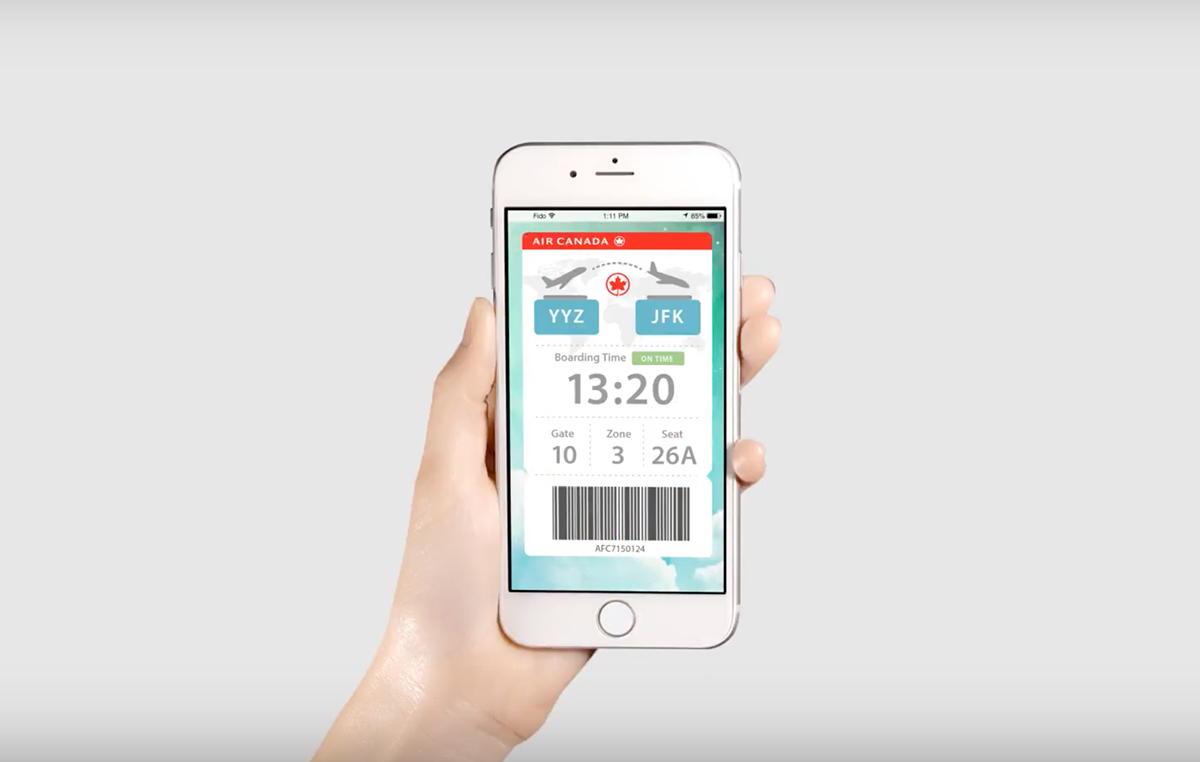
Video prototypes are digital animations or simulations of a product in action. They are often used to demonstrate the product’s features and benefits to stakeholders and to help build excitement and interest in the product.
Purpose of Video Prototype Model
- User Experience Testing: They enable the testing of user interactions and experiences before the final product is developed
- Iterative Design: Video prototypes facilitate iterative design processes, allowing for quick modifications and refinements based on feedback and evolving requirements
- Early Problem Identification: By simulating user interactions, video prototypes can reveal potential issues and challenges in the design
Example of Video Prototype Model
- Onboarding Process: The video prototype demonstrates how a user downloads the app from an app store
- Browsing Products: The video depicts a user opening the app and browsing through various categories of groceries.
- Adding to Cart: The prototype illustrates how items are added to the cart, showcasing smooth animations and intuitive interactions
- Checkout Process: The video follows the user through the checkout process, displaying secure payment methods and delivery options
- Order Tracking: The prototype shows how users can track their orders in real-time, providing updates on delivery status and estimated arrival times
6. Horizontal Prototyping Model
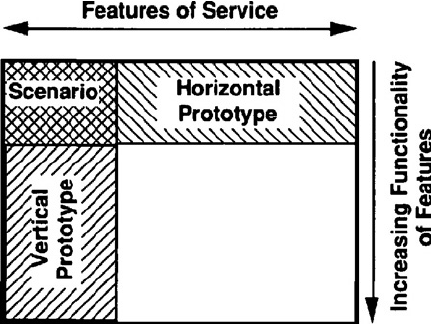
Horizontal prototypes are low-fidelity models that demonstrate the basic functions and features of a product. These are used to test and refine the design of a product’s external features, such as its shape, size, and aesthetics. This type of prototype is particularly useful for consumer-focused products that rely on a visual appeal to drive sales.
Horizontal Prototyping Purpose
- Functionality Validation: To assess the core features and interactions of the app or web platform.
- User Feedback: To gather early user input and identify potential usability issues.
- Stakeholder Alignment: To align project stakeholders on the project’s direction and functionality.
- Risk Mitigation: To identify and address technical challenges or design flaws early in the development process.
- User Flow Refinement: To refine the user flow and identify any bottlenecks or gaps.
- Proof of Concept: To demonstrate the feasibility of the concept to investors or decision-makers.
Horizontal Prototyping Examples
- Social App: Prototype login, registration, and profile setup.
- E-commerce Site: Test navigation, search, and product selection.
- Project Dashboard: Align on layout and functionality.
- Analytics Platform: Spot performance, and data challenges.
- Travel App: Refine user journey, and booking process.
- Language App: Demonstrate a unique gamified approach.
Category 3 – Functional & Technical Prototypes
After flow and usability are clear, it’s time to check if the product actually works. These prototypes focus on functionality—making sure features behave as expected in real scenarios.
7. Working Model Prototype for Development
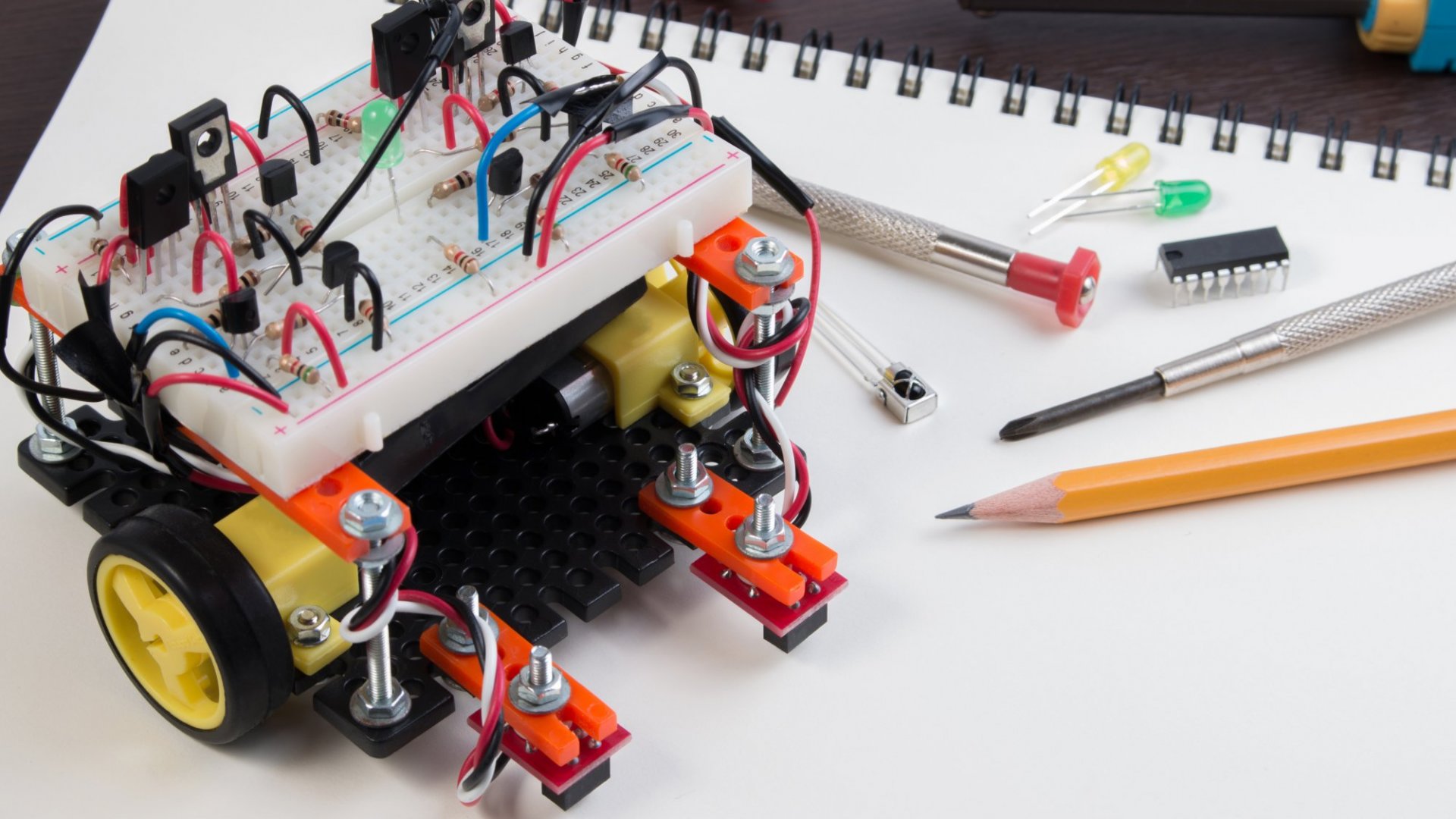
A working model is a fully functional prototype that operates like the final product. This type of prototype is used to validate the design, test the product’s functionality, and ensure that it meets all of the required specifications.
Purpose of a Working Model Prototype
- Validation: It is created to validate and test the feasibility of a concept or idea before investing significant resources into full-scale development
- Risk Reduction: By identifying potential flaws, challenges, or improvements early in the development process, a working model prototype helps reduce risks associated with a full-scale implementation
- Communication Tool: A working model prototype facilitates effective communication between development teams, designers, stakeholders
Example of a Working Model Prototype
Let’s consider the development of a new smartphone app for a food delivery service.
- Conceptualization: The app development team comes up with a concept for a new app that allows users to order food from various restaurants and have it delivered to their location
- Prototype Development: The team creates a working model prototype of the app’s core functionality, focusing on key features such as restaurant selection, menu browsing, ordering, payment, and tracking
- Feasibility Testing: The prototype is tested on a limited scale with a group of potential users to ensure that the ordering process works smoothly
- User Feedback: Users provide feedback on their experience using the prototype. This feedback helps identify any usability issues, bugs, or areas for improvement
- Iteration: Based on user feedback, the development team makes necessary adjustments to the prototype, such as refining the user interface, optimizing the ordering process, and enhancing the tracking functionality
- Presentation to Stakeholders: The working model prototype is presented to stakeholders, such as investors and company executives, to showcase the app’s functionality and potential value
8. Vertical Prototyping Model
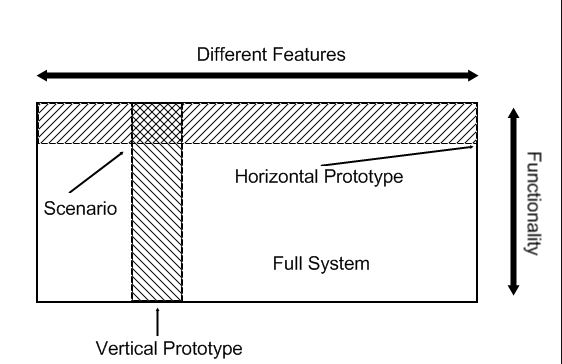
Vertical prototypes are high-fidelity models that demonstrate the full range of capabilities and features of a product. This type of prototype is often used later in the development process and is designed to be as close as possible to the final product.
Vertical prototypes are used to test and refine the internal components and mechanics of a product. This type of prototype helps to ensure that the product is functional and can perform as intended.
Vertical Prototyping Purposes
- Functionality Validation: To test and validate the core functionalities of the app or web application.
- User Interaction Testing: To assess the user interface design and interaction flow with a limited set of features.
- Stakeholder Alignment: To align the development team, stakeholders, and clients on the project’s direction and features.
- Early Issue Identification: To identify and address potential issues and challenges before full development begins.
- User Feedback Collection: To gather initial user feedback on the concept, design, and usability of the application.
- Proof of Concept: To demonstrate the feasibility of the application’s core features and technical architecture.
Vertical Prototyping Examples
- Food App: Browse, add, checkout; no profiles.
- E-Commerce Site: Home, products, simple checkout.
- Social Media: Post, follow, like; no messaging.
- Finance App: Input, goals, basic reports; no investments.
- Education App: Courses, videos, quizzes; basic paths.
- Travel Platform: Search, view, book; no extras.
9. Simulations to Replace Prototypes
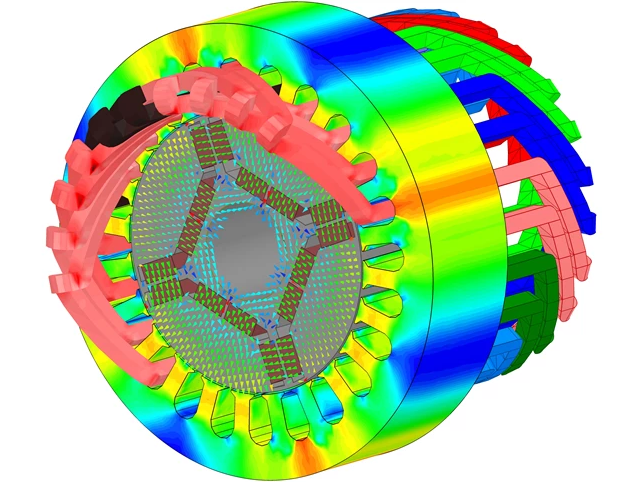
Simulations are computer-based models that demonstrate how a product might function in the real world. These are computer-generated models that allow designers and developers to test and refine their ideas in a virtual environment. This type of prototype is often used to test the performance of a product or to see how it might behave in different scenarios.
Simulations Model Purpose
- This Model is a conceptual and practical tool used in various fields to simulate and visualize complex systems, processes, or scenarios.
- Its primary purpose is to test, validate, and refine ideas, strategies, and designs before implementing them in the real world.
- This model aids in decision-making by providing insights into potential outcomes and identifying areas of improvement or optimization
Simulations Model Examples
- Aerospace Engineering: Developing a new aircraft design using a Simulation Prototype Model allows engineers to simulate flight dynamics, aerodynamics, and structural integrity before building a physical prototype
- Urban Planning: City planners can utilize a Simulation Prototype Model to simulate traffic flow, population growth, and infrastructure changes to optimize city layouts and anticipate future challenges
- Medical Research: Researchers can simulate the behavior of drugs within the human body to predict potential effects and interactions, aiding in the design of safer and more effective treatments
- Architectural Design: Architects can create simulation prototypes to visualize building designs, test energy efficiency, and assess structural integrity before construction begins
Category 4 – User-Centered & Feedback Prototypes
Even if everything looks right, the real test is how users respond. These prototypes involve users directly so you can refine the product based on real feedback, not assumptions.
10. Wizard of Oz Prototypes
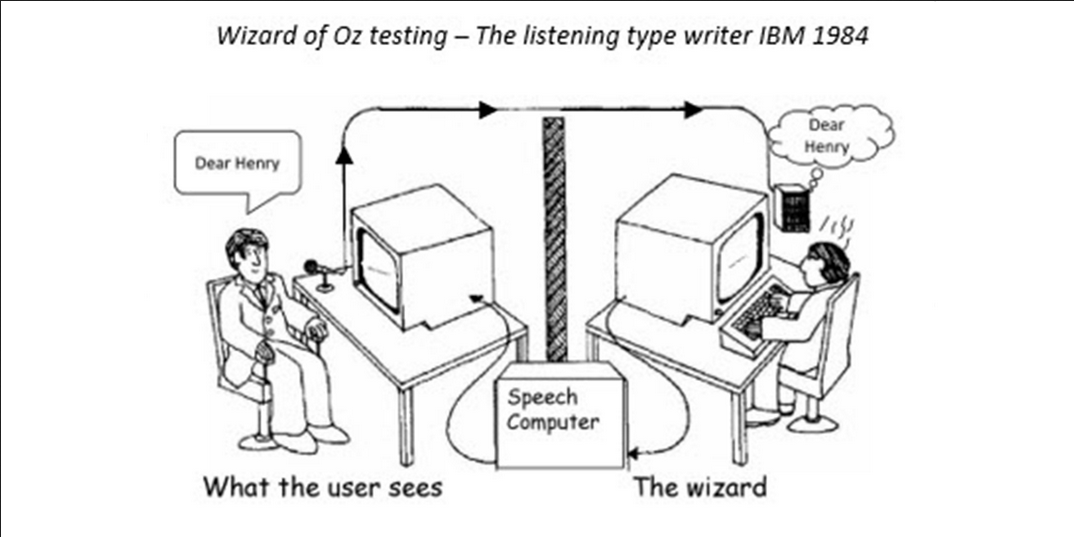
Both are interactive prototypes that allow users to test and experience a product without the full range of features and functionality. This type of prototype is often used to test the viability of a product concept and to refine the product’s user experience. It allows designers and developers to test the product’s usability and identify areas for improvement.
Wizard of Oz Prototype Purposes
- User Interaction Testing: Evaluate user responses and refine interactions by simulating a fully functional interface using human operators behind the scenes.
- Concept Validation: Validate app or web concepts by providing users with a seemingly operational interface while collecting feedback on functionality and usability.
- Early Iteration: Quickly iterate and fine-tune design concepts based on user reactions and preferences.
- Cost-Efficient Development: Test ideas without fully implementing complex backend systems, potentially saving development time and resources.
Wizard of Oz Prototypes Examples
- Voice Assistant App: Users interact with a voice-controlled app that appears functional but is actually operated by human “wizards” interpreting voice commands.
- E-commerce Chatbot: A chatbot assists users in an online store, responding as if automated, but with human agents behind the scenes managing responses and transactions.
- Language Learning App: Users engage with a language learning app that simulates real-time translation, with language experts manually providing translations in the background.
- Navigation Interface: A map app offers apparent GPS-guided directions, while in reality, human operators guide users based on their inputs.
11. User-Driven Prototype
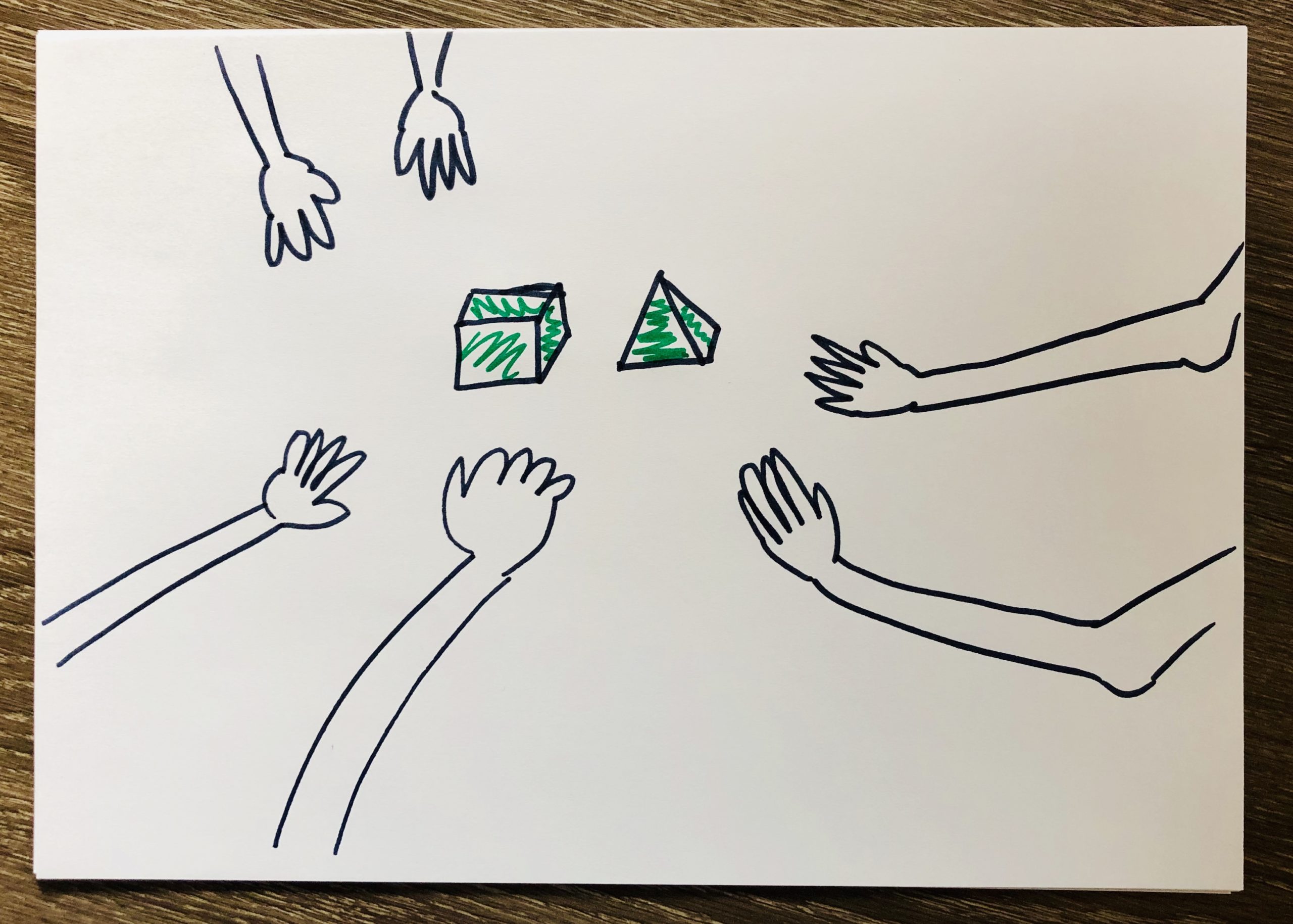
User-driven prototypes are prototypes that are created and tested by real users. This type of prototype allows designers to understand the needs and preferences of the target market, and to refine the product’s design and functionality accordingly. This type of prototype allows designers and developers to understand how users will interact with the product and to identify any potential issues before full-scale production.
Purpose of User-Driven Prototype Model
- User-Centric Design: This Model focuses on involving end-users and stakeholders throughout the software development process
- Early Feedback: By creating functional prototypes at various stages, developers can gather valuable feedback from users
- Iterative Development: The model promotes an iterative approach, where multiple prototype versions are developed, refined, and validated
Example of User-Driven Prototype Model
Scenario: Developing a Mobile Shopping App
- Requirement Gathering – Developers collaborate with stakeholders to outline initial requirements and user expectations
- Low-Fidelity Prototype – A basic wireframe prototype of the app’s layout and navigation is created to get users feedback
- Final Development and Deployment
- The insights gained from user interactions with prototypes guide the development of the final app versions
- The app is thoroughly tested and deployed to the app store, now containing features and designs that have been validated by the users
Category 5 – Physical & Real-World Prototypes
If your product goes beyond screens, you need to see how it performs in real life. These prototypes help test things like usability, durability, and how people interact with the product physically.
12. 3D Printing or Rapid Model in Software Engineering
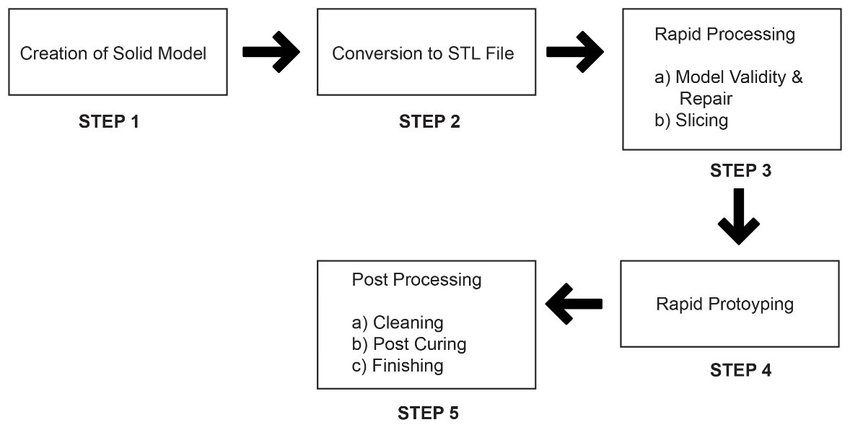
3D printing or rapid prototyping is a process that allows designers to quickly produce a physical model of their product design. It is an increasingly popular way to create prototypes, especially for products that require complex shapes and geometries.
This type of prototype is useful for testing the fit and form of a product, as well as for visualizing how different materials and finishes will look. With the ability to print a model in a matter of hours, this type of prototype can help designers and developers quickly test and refine their ideas.
Purpose of 3D Printing or Rapid Model Prototyping
- Customization: 3D printing facilitates the creation of customized and intricate designs that might be challenging with traditional manufacturing techniques
- Complex Geometry: It can produce complex geometries, internal structures, and fine details that are hard or impossible to achieve through other methods
- Iterative Design: Allows for easy modification and refinement of prototypes based on real-world testing and user feedback
- Low-Volume Production: Ideal for producing small batches or limited runs of products, reducing the need for costly molds or tooling
Examples of 3D Printing or Rapid Model Prototyping
- Automotive Industry: Prototyping vehicle parts, such as interior components, engine parts, and custom car accessories
- Aerospace Sector: Creating intricate models of aircraft components to test aerodynamics and structural integrity
- Architecture: Creating detailed architectural models for client presentations and to assess building designs
- Consumer Products: Designing and testing prototypes for consumer electronics, household gadgets, and toys
- Product Development: Rapidly iterating prototypes for new inventions and innovations, from initial concept to final design
13. Physical Prototype Model for Product Development
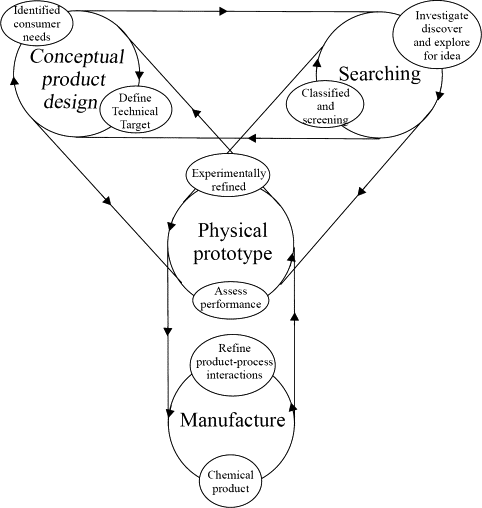
Physical models are full-scale prototypes that are created using traditional manufacturing techniques such as molding, casting, or machining. This type of prototype is used to test the function, strength, and durability of a product, and is especially useful for products that are difficult to visualize in 3D printing. They are useful for getting a sense of the size, scale, and overall look and feel of a product, and are often used to demonstrate concepts to stakeholders.
Purpose of Physical Prototype Model
- It is a tangible representation of a product or system, created to visualize, test, and validate design concepts
- It allows stakeholders to interact with a physical version of the product, gaining a better understanding of its functionality
- The primary purpose is to identify design flaws, improve functionality, and gather feedback early in the development process
Example of Physical Prototype Model
- Consumer Electronics: A smartphone company develops a physical prototype of a new smartphone model. The prototype allows them to evaluate the placement of buttons, screen size, and weight distribution. Users can provide feedback on user interface and ease of use.
- Product Packaging: A food company designs a physical prototype of new packaging for a snack product. The prototype helps assess the convenience of opening, sealing, and storing the product
- Medical Devices: A medical equipment company develops a physical prototype of a new medical device. Doctors and nurses can provide feedback on usability, ergonomics, and functionality of the device
14. Role-play Through Virtual or Augmented Reality in Design
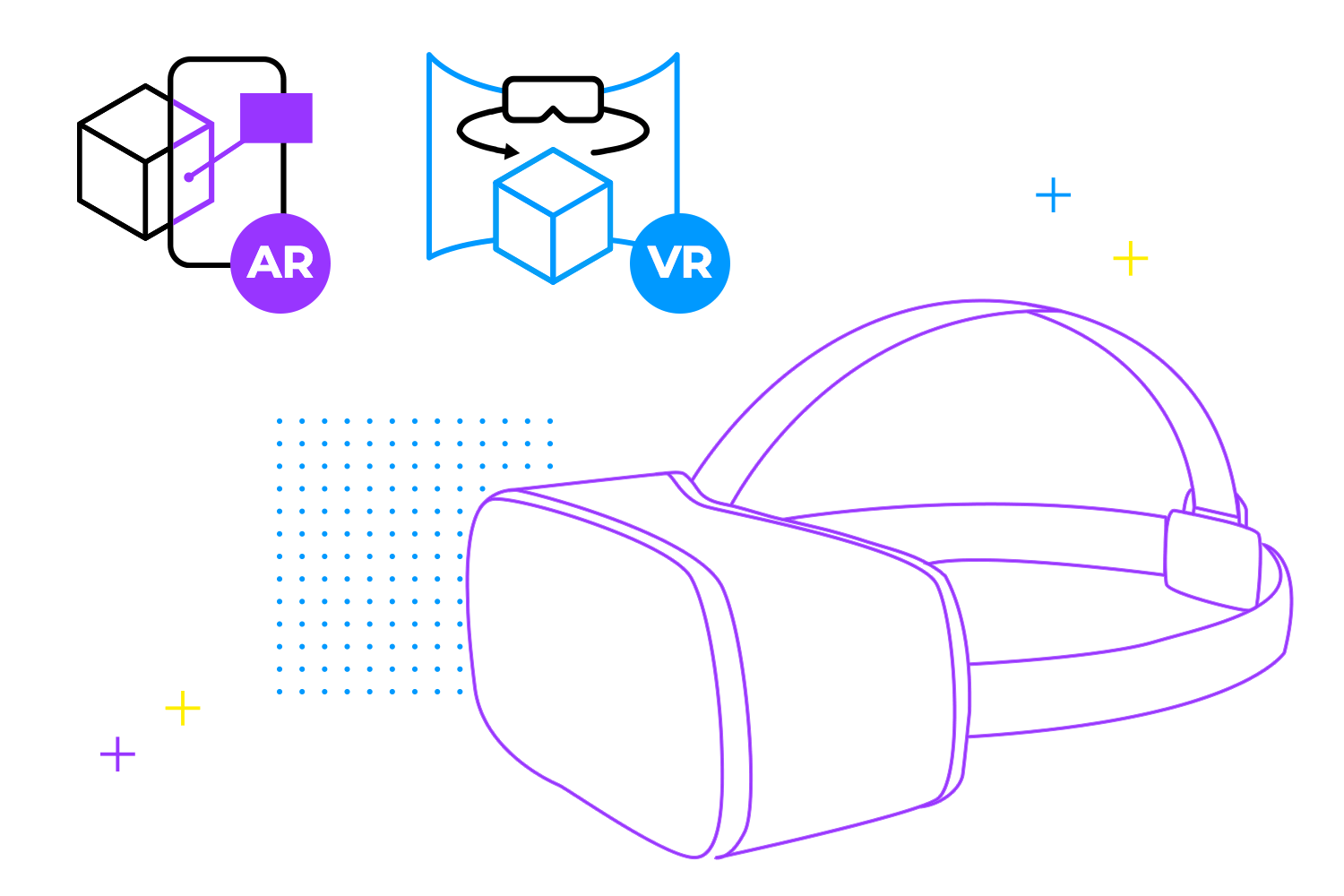
Virtual or augmented reality prototypes allow users to experience a product in a simulated environment, allowing them to interact with it and see how it will function in real life. This type of prototype is particularly useful for products that require a high degree of user interaction, such as gaming or virtual reality experiences.
Purpose of Virtual or Augmented Reality Prototype Model
- User Experience Testing: it enable the testing of user interactions and experiences within a simulated environment
- Iterative Design: it facilitate rapid iterations and refinements of designs by providing a realistic environment for evaluating different design choices
- Training and Onboarding: They can be used for training purposes, allowing users to familiarize themselves with new systems, equipment, or environments
Examples of Virtual or Augmented Reality Prototype Models
- Product Design: Designers can develop AR prototypes to showcase how a product would look and function in real-life settings
- Retail and E-Commerce: Retailers can create AR models to allow customers to virtually try on clothing or visualize furniture placement in their homes, enhancing the online shopping experience
- Tourism and Travel: Virtual reality prototypes can offer virtual tours of tourist destinations or hotels, helping travelers make informed decisions and plan their trips.
Compare Low-Fidelity and High-Fidelity Prototypes
The difference is not about design quality—it’s about how much detail and functionality is needed to validate a decision.
| Aspect | Low-Fidelity Prototypes | High-Fidelity Prototypes |
| Focus | Structure, flow, idea validation | Design, interaction, real behavior |
| Speed | Very fast to create | Slower, requires tools or development |
| Cost | Minimal | Higher (design + dev effort) |
| Flexibility | Easy to change | Harder to modify |
| Use Stage | Early-stage validation | Pre-development or stakeholder stage |
Mapped to Your Prototype Types
Low-Fidelity Prototypes (Early Validation)
Used to validate idea, structure, and flow:
- Sketches and Diagrams
- Storyboard Prototypes
- Feasibility Prototypes
- Wizard of Oz (early-stage simulation)
👉 Goal: Test assumptions quickly before investing effort
High-Fidelity Prototypes (Detailed Validation)
Used to validate interaction, design, and functionality:
- Mock-up Prototypes
- Video Prototypes
- Horizontal Prototypes
- Vertical Prototypes
- Working Model Prototypes
👉 Goal: Simulate real experience before development
Beyond Fidelity (Real-World & System Validation)
Some prototypes go beyond “low vs high”:
- Simulations → system behavior testing
- User-Driven Prototypes → feedback-driven iteration
- 3D Printing / Physical Prototypes → real-world interaction
- VR/AR Prototypes → immersive experience testing
👉 These are used when validation requires environment or context, not just UI.
What Most Teams Get Wrong
- Starting with mock-ups too early instead of sketches
- Skipping feasibility checks before UI design
- Treating fidelity as a design decision instead of a validation strategy
Key Takeaway
- Use low-fidelity to explore
- Use high-fidelity to confirm
- Use functional/physical prototypes to validate reality
Once the fidelity and type are clear, the next step is understanding: How prototyping actually fits into real product development workflows
How to Apply Prototyping in Real Product Development Workflows?
Prototyping is not a standalone phase. It runs alongside product development as a continuous validation cycle, helping teams test assumptions before committing to full builds.
Follow a Structured Prototyping Workflow:
- Define the Problem: Every prototype starts with a clear question. Teams identify the user need, the feature to test, and the key assumption that could fail. Without this clarity, prototypes become directionless.
- Choose the Right Prototype Type: The type of prototype depends on what needs validation. Early-stage ideas are tested with sketches or storyboards, while interaction flows require video or horizontal prototypes. Functional risks are handled through working models or vertical prototypes, and real-world behavior is validated using simulations or physical models.
- Build the Prototype: The goal is speed, not perfection. Teams create the simplest version that can be tested—this could be a wireframe in Figma, a clickable flow, a lightweight coded feature, or even a physical model depending on the use case.
- Test with Users or Stakeholders: Instead of asking users what they think, teams observe how they interact. This reveals friction points, confusion in flows, and gaps between expectation and actual experience.
- Iterate or Pivot: Feedback is applied immediately. Flows are simplified, unnecessary features are removed, and usability issues are addressed. If a core assumption fails, the direction changes before development begins.
- Move to Development (Only When Validated): Development starts only after key risks are resolved. At this stage, prototypes have already aligned teams on user flows, functionality, and priorities, reducing rework later.
Use the Right Tools Across Each Prototyping Stage
| Stage | Tools |
| Early ideation | Paper, whiteboards |
| UX and flow design | Figma, Adobe XD |
| Interactive prototypes | Clickable Figma prototypes |
| Functional validation | Lightweight code, MVP builds |
| Simulation | System modeling tools |
| Physical testing | 3D printing tools |
Where Teams Break the Process
Most issues come from skipping validation steps. Teams often move directly from idea to development, rely on internal assumptions instead of user behavior, or overbuild prototypes instead of iterating quickly. This shifts risk later into development, where changes become expensive.
Key Takeaway
Prototyping works when it stays focused on one objective: validate before you build, and iterate before you scale.
Even with a structured workflow, mistakes still happen. The next section is all about common mistakes and misconceptions in prototyping
Avoid 7 Common Mistakes & Misconceptions in Prototyping
Prototyping fails not because of tools or methods, but because teams misuse it. Most mistakes come from treating prototypes as deliverables instead of validation tools.
Mistake #1 – Starting with High-Fidelity Too Early
Teams often begin with mock-ups or detailed UI designs before validating the idea. This slows iteration and locks decisions too early. Early stages require sketches, storyboards, or feasibility prototypes—not polished screens.
Mistake #2 – Skipping Feasibility Validation
Designing flows without checking technical feasibility leads to rework later. Feasibility prototypes should confirm whether core functionality is possible before moving to UX or UI layers.
Mistake #3 – Treating Prototypes as Final Output
A prototype is meant to test and change. When teams treat it as a near-final version, they avoid making necessary adjustments and carry flawed assumptions into development.
Mistake #4 – Ignoring Real User Behavior
Feedback based only on internal teams or stakeholders is often misleading. Without observing actual users interacting with prototypes, usability issues remain hidden.
Mistake #5 – Overbuilding Instead of Iterating
Adding unnecessary detail or functionality increases effort without improving validation. Prototypes should stay minimal and evolve based on feedback.
Mistake #6 – Using the Wrong Prototype Type
Mismatch between goal and prototype type leads to poor insights. For example, using mock-ups to test functionality or using working models to validate basic user flow creates confusion instead of clarity.
Mistake #7 – Delaying Testing Until Late Stages
Testing after high-fidelity or development stages increases cost and limits flexibility. Validation should happen continuously, starting from low-fidelity prototypes.
Once mistakes are avoided, the next critical decision is: When should you stop prototyping and move to production?
When Should You Move from Prototype to Production?
Moving too early leads to rework. Moving too late slows delivery. The shift to production should happen only when key risks are already validated.
Validate Readiness Before Moving to Production
- Core User Flows are Validated: Users can complete key actions without confusion. Navigation, interaction, and flow logic are already tested through horizontal, video, or storyboard prototypes.
- Critical Features are Proven: Important functionalities work as expected. Vertical or working model prototypes confirm that core features perform reliably.
- No Major Usability Issues Remain: Testing no longer reveals fundamental friction. Feedback leads to refinements, not structural changes.
- Feasibility is Confirmed: Technical constraints are resolved. Feasibility prototypes or simulations have already addressed implementation risks.
- Team Alignment is Clear: Design, product, and engineering share the same understanding of scope, behavior, and priorities. The prototype acts as a reference point.
Signs You Are Moving Too Early
- Key flows are still changing
- Features are untested or assumed
- User feedback is limited or inconsistent
- Technical feasibility is unclear
Signs You Are Delaying Unnecessarily
- Only minor visual changes remain
- Feedback is repetitive with no new insights
- Prototype complexity is increasing without new validation
Move to production when uncertainty is low, and changes are incremental—not structural. Once validated, the focus shifts from testing to scaling.
Scale Prototypes into Production-Ready Products with RedBlink
RedBlink connects businesses with certified UI designers and full stack developers who specialize in Figma prototyping and product development.
You can work with experts who help transform ideas into functional prototypes – without delays, budget overruns, or quality concerns. From early-stage concepts to refined interactive designs, the focus remains on delivering prototypes that are ready for real-world validation.
Whether you are building a software product, mobile app, or physical solution, RedBlink provides the right mix of design and development expertise to support every stage of prototyping.
Instead of managing multiple resources, you get access to a streamlined team that handles design, validation, and execution. Get started Now
Find Answers to Common Prototyping Questions
How long does it take to create a product prototype?
Prototype time depends on type and complexity. Sketches take hours, clickable prototypes take days, and working models can take weeks. Faster prototypes focus on validation, not completeness.
What tools are best for creating prototypes?
Prototype tools vary by need. Figma supports UI and interaction design, 3D tools support physical models, and code-based tools support functional prototypes. Tool choice depends on what is being tested.
Can a prototype be used as an MVP?
A prototype becomes an MVP only when it delivers real value to users. MVP includes functional features and deployment, while prototypes focus on testing assumptions before launch.
Who should be involved in the prototyping process?
Prototyping involves product managers, designers, developers, and users. Each role contributes to validation, usability, and feasibility, ensuring decisions are based on real input.
What is the cost of building a prototype?
Prototype cost depends on fidelity and type. Sketches cost minimal, design prototypes require tools and time, and functional prototypes require development resources. Cost increases with complexity.