

Last Updated on September 9, 2026
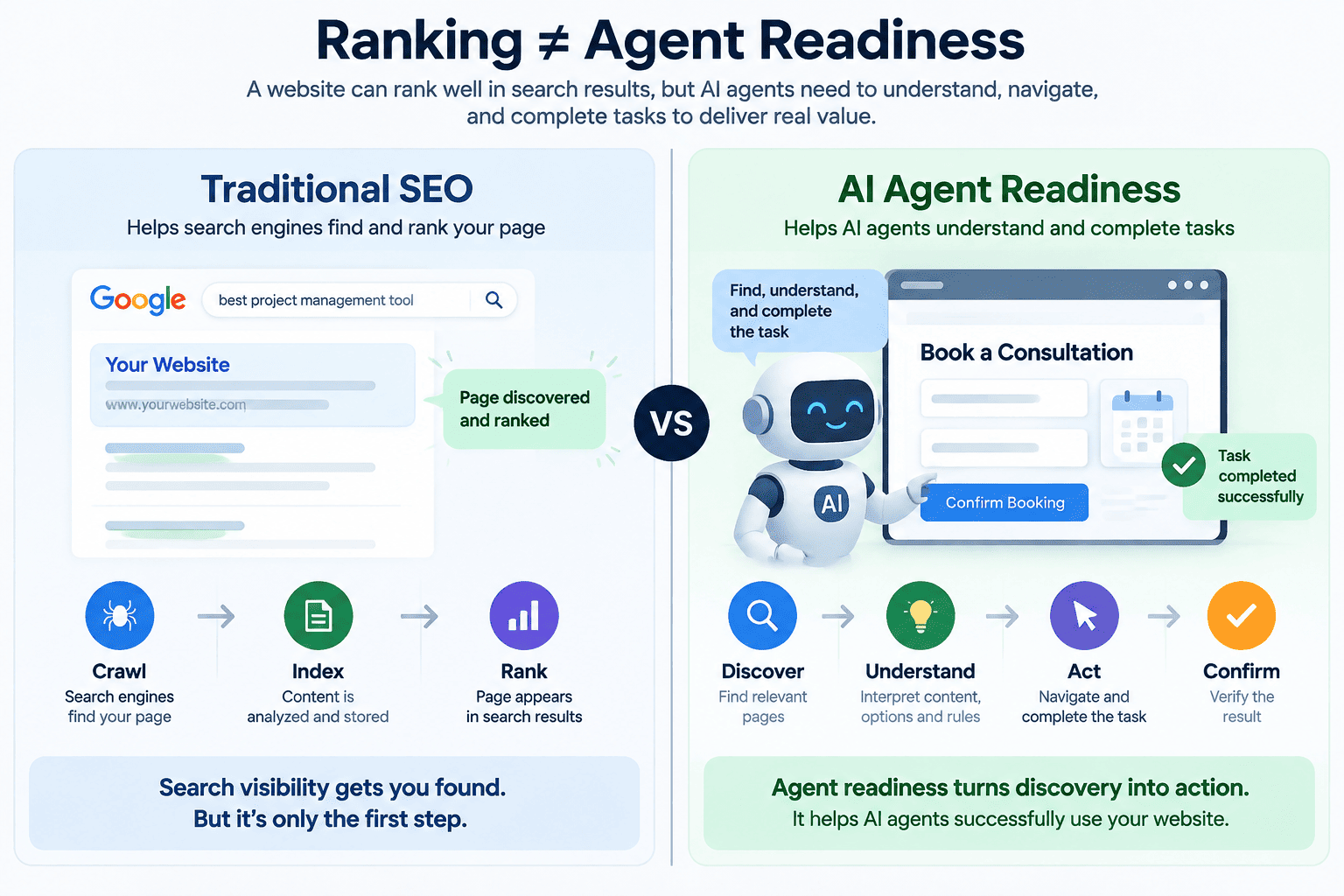
A website can rank well in Google and still fail when an AI agent tries to use it. Search visibility helps an agent discover a page, but discovery alone does not guarantee that it can compare options, navigate forms, or complete the user’s intended action.
An agentic search readiness audit evaluates whether AI agents can find, understand, navigate, and successfully use your website. It connects search fundamentals with content clarity, accessible interfaces, reliable workflows, and appropriate security controls.
The challenge is measurable. The ClawBench study evaluated 153 everyday online tasks across 144 platforms and reported a 33.3% completion rate for Claude Sonnet 4.6. That result reflects the study’s tested models and conditions, rather than a universal success rate for every website or agent.
For businesses, the practical question is straightforward: can an agent complete the journeys that matter to your customers? This guide explains what to audit, how to test those journeys, and which metrics reveal meaningful improvements.
What Is Agentic Search Readiness?
Agentic search readiness is a website’s ability to support an AI agent from information retrieval through task completion. An agent-ready website makes it easier for an autonomous system to identify a relevant offer, understand its conditions, choose the correct action, and verify the result.
For example, an agent helping someone book a consultation may need to determine:
- Which company provides the service.
- Whether the service meets the user’s requirements.
- Where and when it is available.
- What pricing, eligibility rules, or restrictions apply.
- Which control starts the booking process.
- Whether the appointment was successfully confirmed.
A page can contain relevant information and still leave these relationships unclear. Readiness therefore depends on content structure, entity clarity, accessibility, interaction design, and application behavior working together.
For teams connecting website improvements with a wider automation roadmap, RedBlink’s guide to planning and governing AI agent workflows provides related business context.
Agentic Search Readiness vs. Traditional AI SEO and AI Search Visibility
These disciplines address different stages of a user journey. A website needs to be discoverable before an agent can evaluate it, and understandable before the agent can act reliably.
| Area | Primary question | Main focus |
|---|---|---|
| Traditional AI SEO | Can a search engine crawl, index, understand, and rank the page? | Technical accessibility, relevance, content quality, links, and page experience. |
| AI search visibility | Can an AI-powered search experience retrieve and use the page as a source? | Search eligibility, useful information, source quality, and contextual relevance. |
| Agentic search readiness | Can an agent identify the right action and complete it correctly? | Decision clarity, interface semantics, workflow reliability, permissions, and confirmation. |
Google’s guidance on AI features and websites states that supporting pages in AI Overviews and AI Mode must be indexed and eligible to appear in Google Search with a snippet. There are no additional technical requirements or special schema markup needed for inclusion, and eligibility does not guarantee visibility.
Agent readiness adds an operational requirement: once an agent reaches your website, it must be able to use what it finds. This makes it a complementary investment alongside RedBlink’s AI SEO services, particularly for websites with lead forms, bookings, checkout flows, or authenticated applications.
How Do AI Agents Interact With Websites?
Browser agents can interpret different representations of a page, depending on their implementation. Google’s generative AI optimization guide describes approaches that include visual renderings, the Document Object Model, and the accessibility tree.
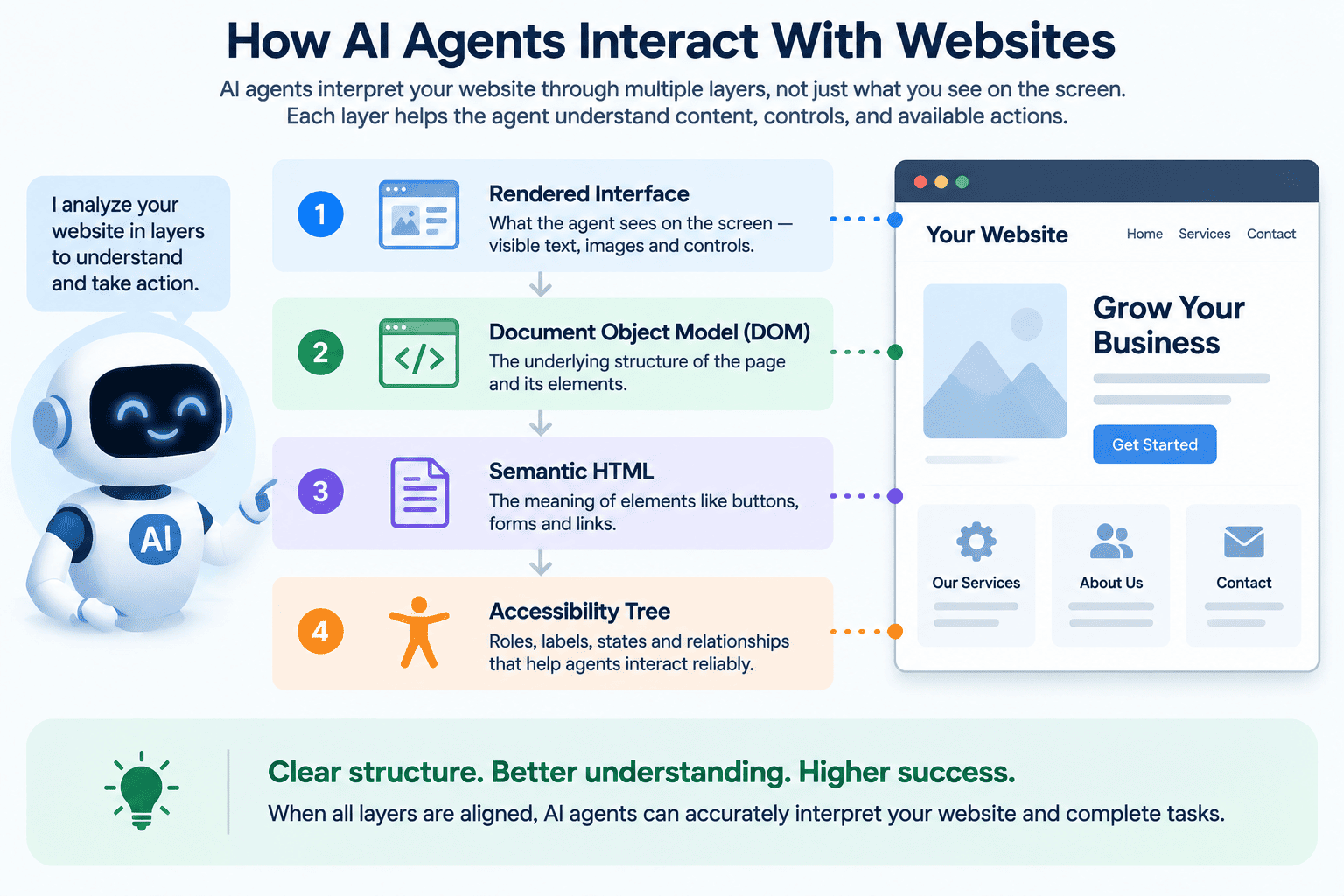
| Website layer | What it communicates |
|---|---|
| Rendered interface | Visible text, controls, dialogs, layout, and page state. |
| Document Object Model | Elements, attributes, page structure, and relationships. |
| Semantic HTML | The native purpose of links, buttons, headings, forms, and tables. |
| Accessibility tree | Accessible names, roles, states, and relationships exposed by the browser. |
Use Native HTML to Make Actions Explicit
Two controls can look identical while exposing very different information to a browser. Consider a clickable container:
<div onclick="submitForm()">Send request</div>A native submit button inside a form expresses its purpose directly:
<button type="submit">Send request</button>Use links for navigation, buttons for actions, labels for form inputs, and headings for content hierarchy. Native semantics reduce the amount of meaning that software must infer from styling or custom behavior.
Give Controls Clear Accessible Names
An icon-only button needs a programmatic name that explains its purpose. For example:
<button type="button" aria-label="Search">
 <span aria-hidden="true">🔍</span>
</button>
The W3C guidance on accessible names and descriptions explains how visible text, associated labels, and attributes such as aria-label and aria-labelledby communicate control purposes.
Chrome’s accessibility guidance for agents also emphasizes programmatic labels and valid interactive structure. These improvements support machine interpretation while preserving the importance of accessibility for people.
Why Do AI Agents Fail on Websites?
Agents can lose progress when controls are ambiguous, interfaces change unexpectedly, or the website does not clearly communicate what happened after an action. Failures can also originate in the agent itself, including weak reasoning, perception errors, or tool limitations.
An audit should distinguish website defects from agent limitations so that the remediation addresses the actual cause.
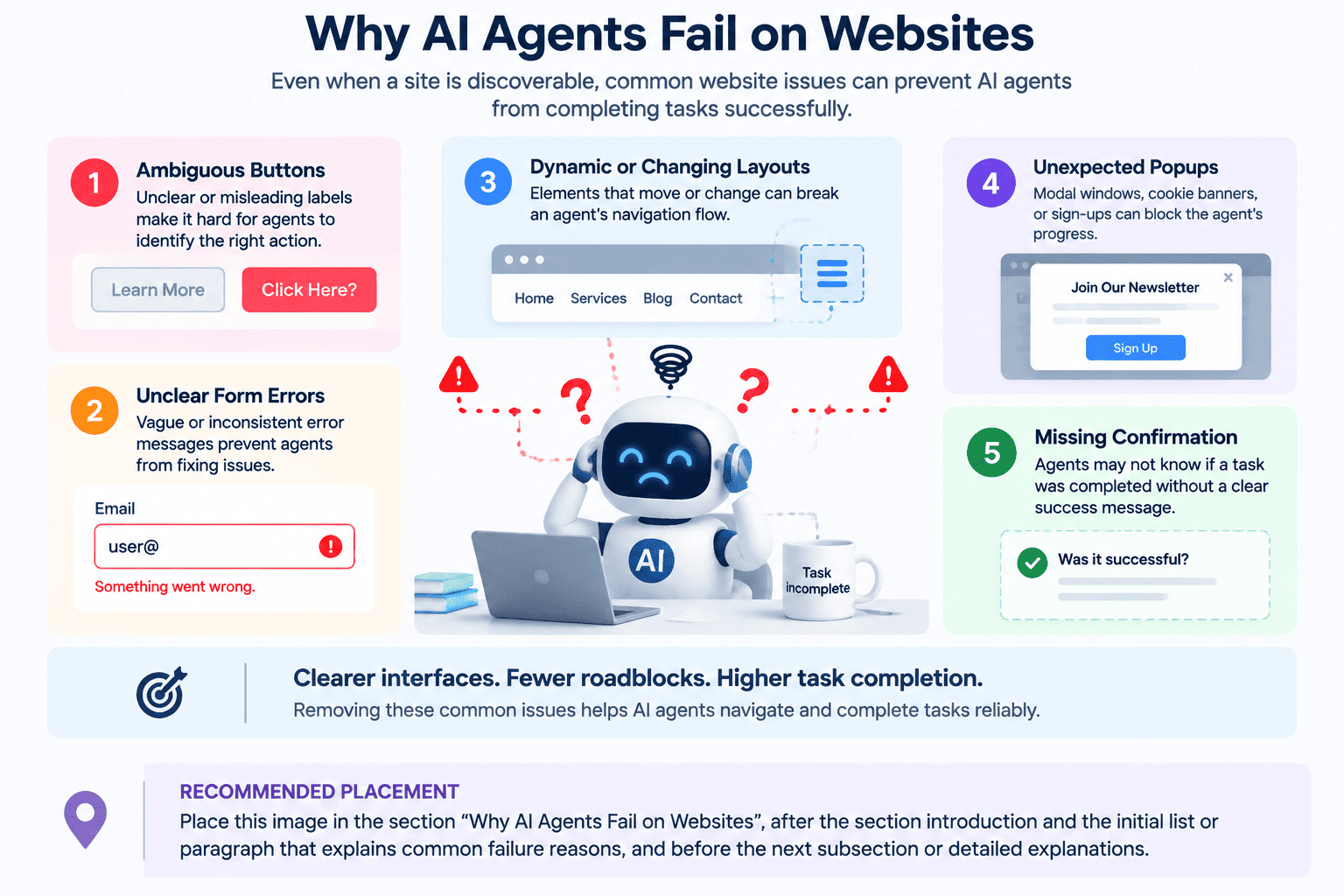
| Obstacle | Possible failure | Remediation |
|---|---|---|
| Ambiguous controls | The agent selects the wrong action. | Use descriptive labels and appropriate native elements. |
| Unclear selection states | The agent misreads a filter, tab, checkbox, or toggle. | Expose selected, expanded, checked, and disabled states. |
| Layout shifts | A target moves before the agent interacts with it. | Reserve space for dynamic content and stabilize important controls. |
| Unexpected overlays | A banner or dialog blocks the workflow. | Provide clear controls and predictable dialog behavior. |
| Vague validation errors | The agent cannot determine which input needs correction. | Identify the affected field and explain how to fix it. |
| Automation barriers | The workflow requires human intervention. | Provide an intentional handoff without bypassing security controls. |
| Missing confirmation | The agent cannot verify whether an action succeeded. | Display an explicit result with relevant confirmation details. |
The CAP browser-agent benchmark, which includes 420 tasks across 108 real-world websites, identifies perception-heavy interactions as a major bottleneck in its evaluated systems. This reinforces the value of testing realistic workflows, including visually complex and dynamic steps.
Several successful clicks do not establish task completion. The final outcome must match the user’s request and be independently verifiable.
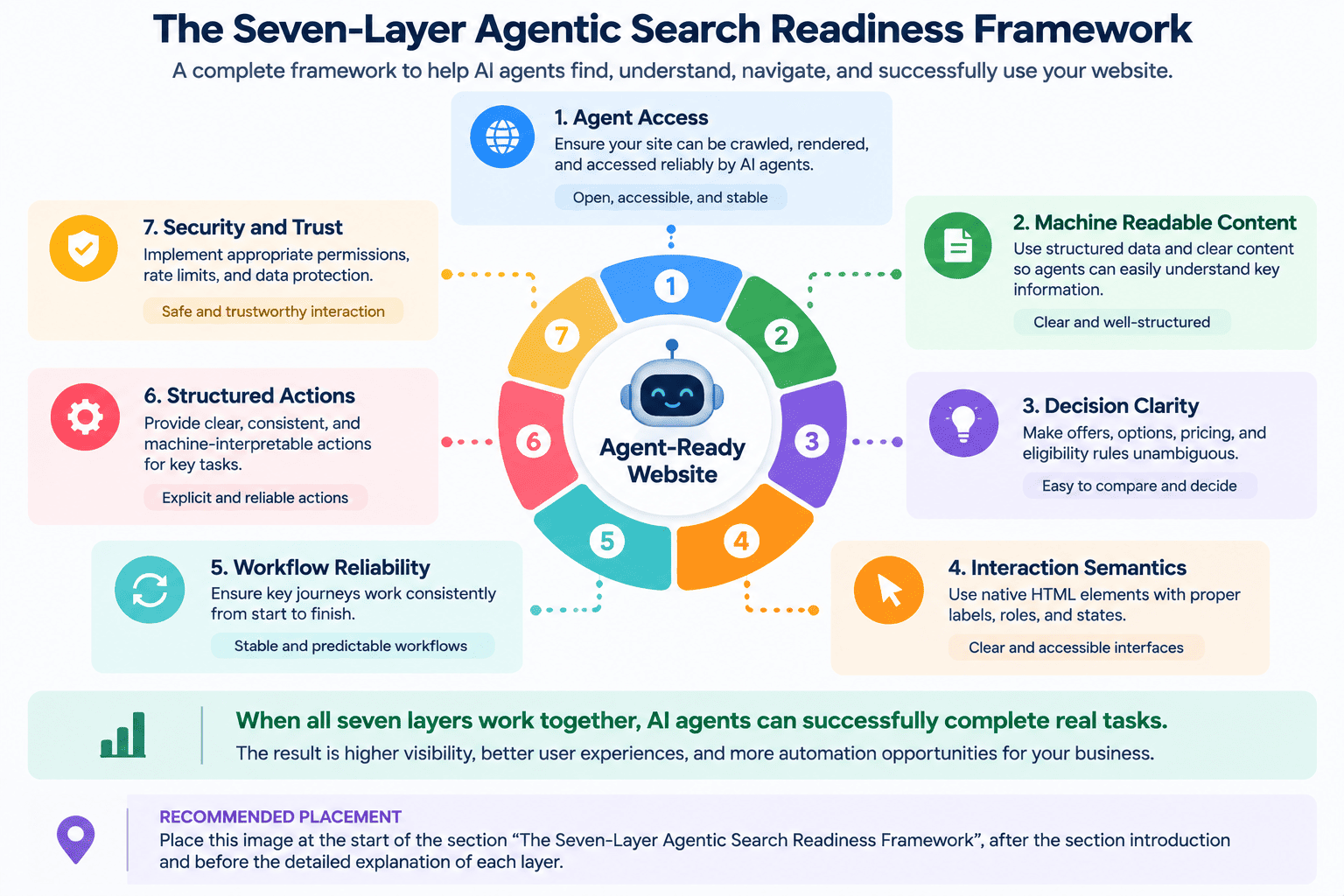
The Seven-Layer Agentic Search Readiness Framework
The following framework organizes the audit into seven practical layers. Use it to diagnose important user journeys; it is an assessment approach, not an official certification or search ranking system.
Layer 1: Discoverability and Agent Access
Audit question: Can the systems you intend to support reach the relevant pages and resources?
Review HTTP responses, internal links, canonical URLs, XML sitemaps, robots.txt rules, authentication, and CDN or firewall policies. Check for accidental restrictions on public content and required resources.
Access policies should reflect the site owner’s intentions. Protect private information through authentication and authorization; crawler directives are not a substitute for access control.
Layer 2: Renderability and Machine-Readable Content
Audit question: Is the information needed for the task available when the page is processed?
Check that service descriptions, product specifications, pricing, availability, policies, and navigation appear reliably after loading. Test delayed responses and rendering failures where they could affect a decision.
JavaScript is compatible with agent-friendly experiences. The concern is whether critical content depends on fragile loading conditions or remains unavailable in the representations used by your target agents.
Layer 3: Entity and Decision Clarity
Audit question: Can the agent determine whether the offer satisfies the user’s requirements?
Clearly identify the provider, product or service, intended audience, location, price or quotation process, eligibility requirements, and exclusions. Keep decision-critical facts consistent across related pages.
Where applicable, structured data can describe those relationships. Follow Google’s structured data guidelines and ensure that markup represents the visible content accurately. Markup cannot compensate for missing or contradictory information.
Layer 4: Accessibility and Interaction Semantics
Audit question: Can the agent identify the available actions, required inputs, and current interface state?
Inspect lead forms, booking controls, product filters, plan selectors, checkout steps, and account settings. Every important control should communicate its purpose and expose relevant state.
Check keyboard operation, associated labels, error relationships, and focus behavior as part of interface quality. Agent-oriented checks complement a broader accessibility review.
Layer 5: Workflow Reliability and Outcome Clarity
Audit question: Can the agent distinguish progress, success, failure, and recovery?
A reliable workflow should make these states observable:
- In progress: The request is being processed.
- Completed: The intended change has been confirmed.
- Failed: The system explains what went wrong.
- Recoverable: A clear retry, correction, or handoff path is available.
Preserve valid inputs after errors and prevent repeated submissions from creating unintended duplicates. For bookings and orders, provide confirmation details that can be checked against the original request.
These fixes often involve frontend behavior and backend logic together. RedBlink’s web application development services cover the engineering work behind those connected experiences.
Layer 6: Structured Agent Actions
Audit question: Would a structured tool make a valuable task easier to perform reliably?
Some workflows may benefit from explicit operations for checking availability, retrieving order status, searching inventory, or requesting a quote.
Chrome’s WebMCP documentation describes how websites can expose structured tools to compatible browser agents. These tools provide defined inputs and operations instead of requiring every step to be inferred from interface navigation.
WebMCP remains an emerging, experimental capability and is not a prerequisite for this readiness framework. Evaluate compatibility and demonstrated task improvements before adopting it. Preserve a usable website experience for people and agents that do not support the integration.
Layer 7: Security, Trust, and Human Control
Audit question: What may the agent access or change, and where must the user remain in control?
Evaluate information sensitivity and action consequences separately. A read-only request can expose private information, while a state-changing action can create a financial or operational commitment.
- Authenticate access to private resources.
- Enforce authorization and least-privilege permissions.
- Validate tool inputs and business rules on the server.
- Require appropriate confirmation for consequential actions.
- Log important changes and provide recovery or human handoff paths.
Chrome’s WebMCP security guidance discusses indirect prompt injection, untrusted content, and consequential actions. Treat tool descriptions and annotations as useful signals, while enforcing access and business constraints in the application itself.
Agent Readiness Priorities by Website Type
The audit should reflect what users need an agent to accomplish. Different websites require different emphasis across the seven layers.
| Website type | Highest-priority areas | Example task |
|---|---|---|
| Publisher or blog | Access, content structure, source clarity. | Find a relevant article and verify its supporting evidence. |
| B2B service website | Service fit, inquiry forms, confirmation. | Identify the appropriate service and request a quote. |
| SaaS website | Plan comparison, signup, account permissions. | Compare plans against specific requirements. |
| Ecommerce store | Product details, stock, cart state, checkout reliability. | Find an available product within a budget. |
| Booking platform | Availability, time zones, selection states, confirmation. | Find an appointment within an allowed time window. |
| Marketplace | Search, comparison, provider identity, transactions. | Compare eligible offers from suitable providers. |
| Documentation portal | Retrieval, navigation, version clarity. | Locate instructions for a specific product version. |
| Web application | Permissions, state changes, error recovery, audit logs. | Update an authorized setting and verify the result. |
How to Run an Agentic Search Readiness Audit
A useful audit tests complete tasks. Individual pages may pass technical checks while the journey between them remains unreliable.
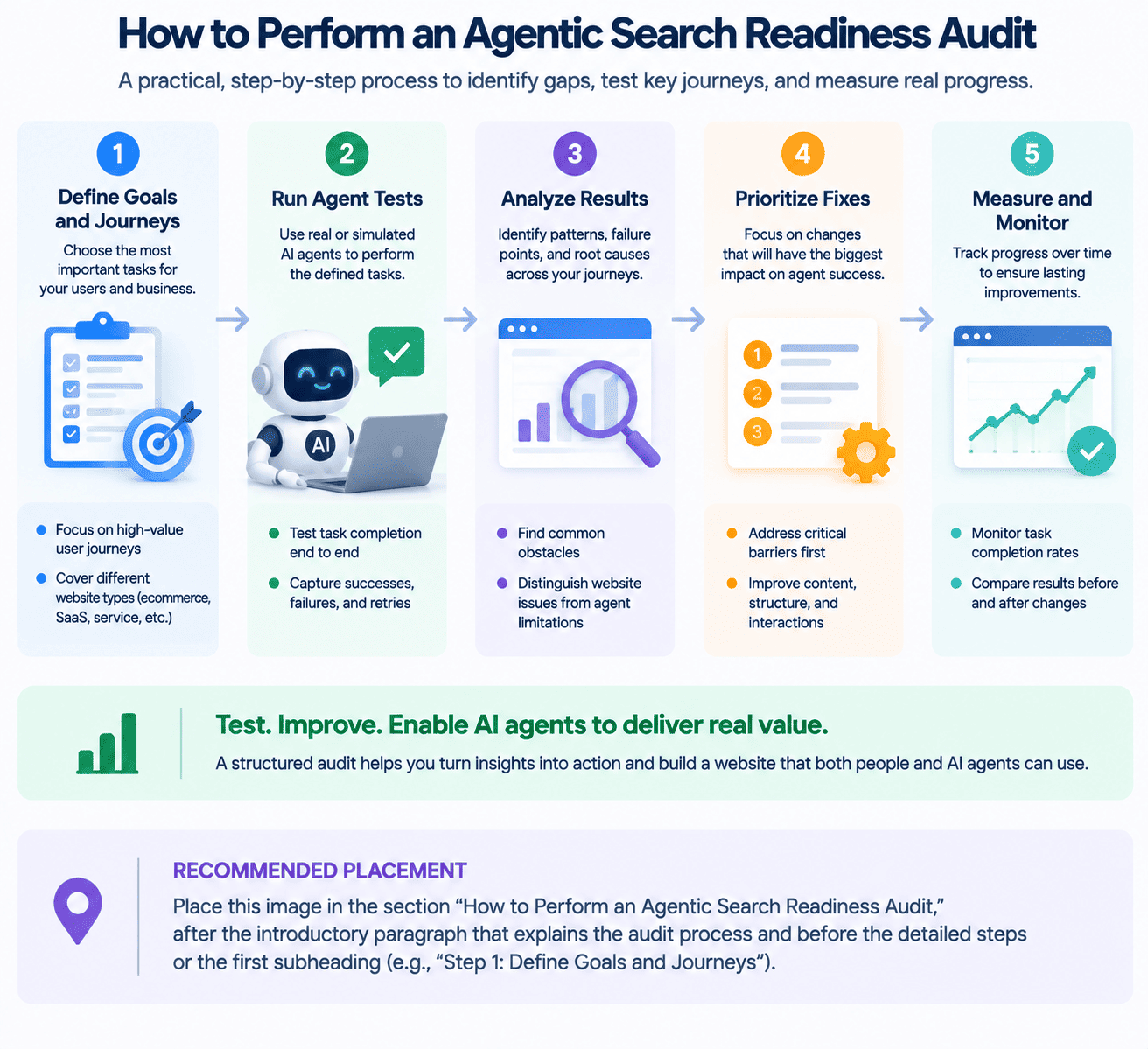
Step 1: Define High-Value Journeys and Success Criteria
Select a small set of realistic tasks, such as comparing plans, locating a policy, checking eligibility, requesting a quote, or scheduling a consultation.
Write each task as a natural-language goal. Define what counts as success before testing, including constraints, required confirmation, and any point where human approval is necessary.
For example: “Find the earliest available consultation next week after 2 p.m. in my time zone, and present the details for approval before booking.”
Step 2: Inspect Access, Rendering, and Controls
Review the pages involved in each journey against the seven-layer framework. Confirm that required URLs load, important facts appear, controls have meaningful labels, and public and authenticated steps behave as intended.
Record each issue against the journey it affects. A missing label on a booking control is more actionable when the audit explains which task it prevents.
Step 3: Run Lighthouse Agentic Browsing Checks
Use automated checks as a technical checkpoint. According to the current Lighthouse Agentic Browsing scoring documentation, this experimental category requires Chrome 150 or later, while WebMCP audits require origin-trial registration.
The category reports a fractional pass ratio, individual results, warnings, and informational signals rather than the standard weighted 0–100 Lighthouse score.
A passing report is not proof of end-to-end task completion, search visibility, or safe operation. Follow it with behavioral testing. Chrome also documents how to automate Lighthouse audits with AI agents during development and debugging.
Step 4: Test With Real Browser Agents
Give the agent the user’s goal without supplying a predefined click path. Observe whether it chooses the correct page, interprets constraints, navigates the workflow, and recognizes the result.
Use staging environments, test accounts, and sandbox transactions where appropriate. Tests should not create unintended purchases, bookings, or customer communications.
Repeat important journeys and include meaningful variations, such as unavailable dates, invalid inputs, narrow product requirements, and interrupted sessions. Record the agent, model, browser version, viewport, date, and test conditions so results remain interpretable.
Step 5: Document Failures and Prioritize Fixes
For each test, record:
- The requested task and expected outcome.
- Whether the result was complete, partial, failed, or handed off.
- The step where progress became unreliable.
- Evidence such as screenshots, logs, or confirmation records.
- Retries, completion time, and recovery behavior.
- The likely cause, business impact, owner, and next action.
Prioritize frequent failures on valuable journeys, while treating security defects as a separate urgent category. Fixing a recurring quote-submission failure will usually matter more than polishing a rarely used informational path.
End the audit with a remediation backlog and a retest plan. RedBlink’s overview of AI agents in software development provides additional context for connecting implementation, review, and testing.
How to Measure AI Agent Readiness?
Measure search visibility, automated activity, and task completion separately. More AI-related exposure does not establish that your website has become easier for an agent to use.
| Area | What to track | What it establishes |
|---|---|---|
| AI search visibility | Impressions, visible pages, countries, devices, and trends. | Whether content appears in supported AI search experiences. |
| Automated activity | Identified clients, requested paths, status codes, and request patterns. | Which detectable automated systems access the site. |
| Task completion | Verified outcomes, failures, retries, duration, and handoffs. | Whether tested agents accomplish defined goals. |
Track AI Search Visibility
Google’s Search Generative AI performance report announcement states that the insights rolled out worldwide on August 31, 2026. The reports provide visibility into impressions from generative AI features, with dimensions including pages, countries, and devices for Search.
Use these insights to understand discovery. They do not measure whether an agent successfully completes a website workflow.
Monitor Automated Access
Server logs, CDN data, and bot-management tools help identify automated requests. For example, Cloudflare AI Crawl Control provides visibility into AI-service access and crawler request patterns.
Traffic classification has limits. A crawler request is not evidence of an interactive session, and user-agent information alone does not reliably identify every browser agent.
Make Verified Task Completion the Core KPI
Task completion rate = verified successful runs ÷ total evaluated runs × 100.
Define the evaluation set and treatment of handoffs before calculating the rate. An agent that correctly stops for required approval should be distinguished from one that fails to navigate a form.
Track completion rate alongside retries, time to completion, failure points, confirmation accuracy, and human handoff rate. Compare results under consistent test conditions.
For example, a hypothetical website might achieve 90% success on information retrieval but only 40% on consultation booking. That would indicate a concentrated booking-workflow problem worth investigating, rather than a general discovery issue.
AI Agent Readiness Checklist
Use this checklist to review each priority journey and assign follow-up work.
Access and Availability
- Required public pages and resources are reachable.
- HTTP responses, canonical URLs, and sitemap entries are consistent.
- Internal links connect relevant information and action pages.
- CDN and bot policies reflect intended access rules.
- Private resources require appropriate authentication and authorization.
Content and Decision Clarity
- Provider, offer, audience, location, and eligibility are explicit.
- Pricing or the quotation process is clear.
- Availability, exclusions, and relevant policies are easy to locate.
- Critical content appears reliably after rendering.
- Structured data matches visible information.
Interaction and Reliability
- Controls have meaningful names and appropriate semantics.
- Forms identify required inputs and explain validation errors.
- Selected, disabled, expanded, and loading states are distinguishable.
- Important controls remain stable during interaction.
- Successful actions produce explicit, verifiable confirmations.
- Retries and recovery do not create unintended duplicate actions.
Testing and Measurement
- High-value journeys have predefined success criteria.
- Real agents are tested with goal-based instructions.
- Repeated runs cover relevant constraints and failure conditions.
- Results record agent configuration, failures, retries, and handoffs.
- Task completion is reported separately from search visibility.
Security and Structured Actions
- Permissions follow least-privilege principles.
- Consequential actions have appropriate approval controls.
- Important state changes are logged.
- Untrusted content cannot grant additional permissions.
- Optional structured tools address valuable, repeatable tasks.
- A human handoff is available when automation should stop.
Turn Readiness Gaps Into an Implementation Plan
An agentic search readiness audit should produce a clear sequence of improvements: resolve access blockers, clarify decision-critical content, repair unreliable interactions, and verify the resulting workflows. Introduce structured actions where testing shows they add value.
At RedBlink, we approach agent readiness as a combined content, search, and engineering challenge. Our AI consulting services can help shape priorities, while our AI software development services support implementation across intelligent applications and integrations.
Want to assess your website’s readiness for AI agents?Talk to RedBlink about your priority website journeys and the changes needed to make them clearer, more reliable, and easier to verify.
Frequently Asked Questions About Agentic Search Readiness
Does agentic search readiness replace AI SEO?
No. AI SEO supports discovery and search visibility. Agent readiness extends the assessment to whether an agent can interpret information, operate controls, and complete an intended task after reaching the website.
Is WebMCP required for an agent-ready website?
No. Clear content, semantic HTML, accessible controls, stable workflows, and verifiable outcomes are the starting point. Consider WebMCP when compatible structured tools improve a specific task.
How often should a website be tested?
Retest after major changes to navigation, forms, checkout, booking, authentication, or application behavior. Also review important journeys when the agents or browser configurations used in your evaluation change.
Should testing include mobile and desktop?
Test the environments your target agents actually use. Include mobile and desktop layouts where relevant, because responsive menus, dialogs, and controls can create different obstacles.
Can AI agents complete tasks behind a login?
Some agents can work within authenticated sessions when the user authorizes access and the system supports it. The website must continue to enforce identity checks, permissions, data protection, and appropriate confirmation requirements.
Can analytics distinguish AI crawlers from interactive agents?
Only partially. Logs and bot-management systems can identify many known automated clients, but some interactive agents resemble ordinary browser traffic. Combine available traffic signals with controlled tests and application-level outcome tracking.
Which journeys should be optimized first?
Start with high-value tasks such as product comparison, quote requests, bookings, lead forms, and account actions. Prioritize observed failures that prevent user outcomes, and address security defects regardless of traffic volume.