
Last Updated on April 28, 2026
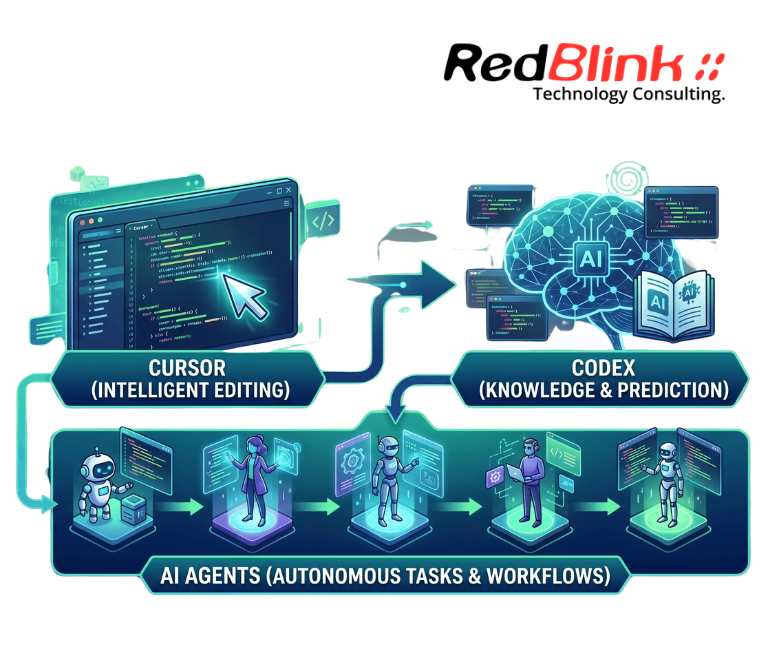
How are Cursor, Codex, and AI agents changing software development? They are turning coding from a mostly manual task into an AI-assisted workflow where developers plan, generate, review, test, and refine code with intelligent tools. Cursor supports AI-native coding inside the editor, Codex works as a coding agent for generating and reviewing code, and AI agents help connect tasks across the software development lifecycle.
The real shift is not “AI replacing developers.” It is the rise of an AI coding stack where coding assistants, context layers, validation tools, and human judgment work together. For software teams, this means faster development cycles, more automated workflows, and a stronger need for architecture, code quality, and review discipline.
Before We Call Everything an AI Agent, What Actually Counts?
The debate around AI agents is not just academic. Developers, founders, and automation builders are openly asking: Do AI agents actually exist, or are we just building fancy AI workflows and calling them “agents”? That question matters because many “agentic” systems are still structured workflows with LLM calls, tools, branching logic, and human review rather than fully autonomous software workers.
A more useful way to think about agents is practical: an AI agent should be able to interpret a goal, select or trigger tools, operate across steps, and return useful output within clear constraints. This is why discussions like What is an Agent? Let’s stop the speculations are useful before comparing Cursor, Codex, and AI agents inside a software development workflow.
The same skepticism applies to adoption. Searches like Is it actually worth learning AI Agents right now, or is it just hype? show that many builders are trying to separate real business demand from tutorial-driven noise. In software development, the answer depends less on hype and more on whether agents can improve planning, code generation, review, testing, deployment, or maintenance in a measurable way.
That is also where production failures enter the conversation. Posts such as Why AI Agents Keep Failing in Production and Beyond the Hype: Why your AI agent fails at real-world business logic. point to the same issue: demos often look impressive, but real systems fail when context, tool reliability, validation, and business logic are weak.
That is why this article treats Cursor, Codex, and AI agents as parts of a broader AI coding stack rather than magic replacements for developers.
What Is an AI Coding Stack in Modern Software Development?
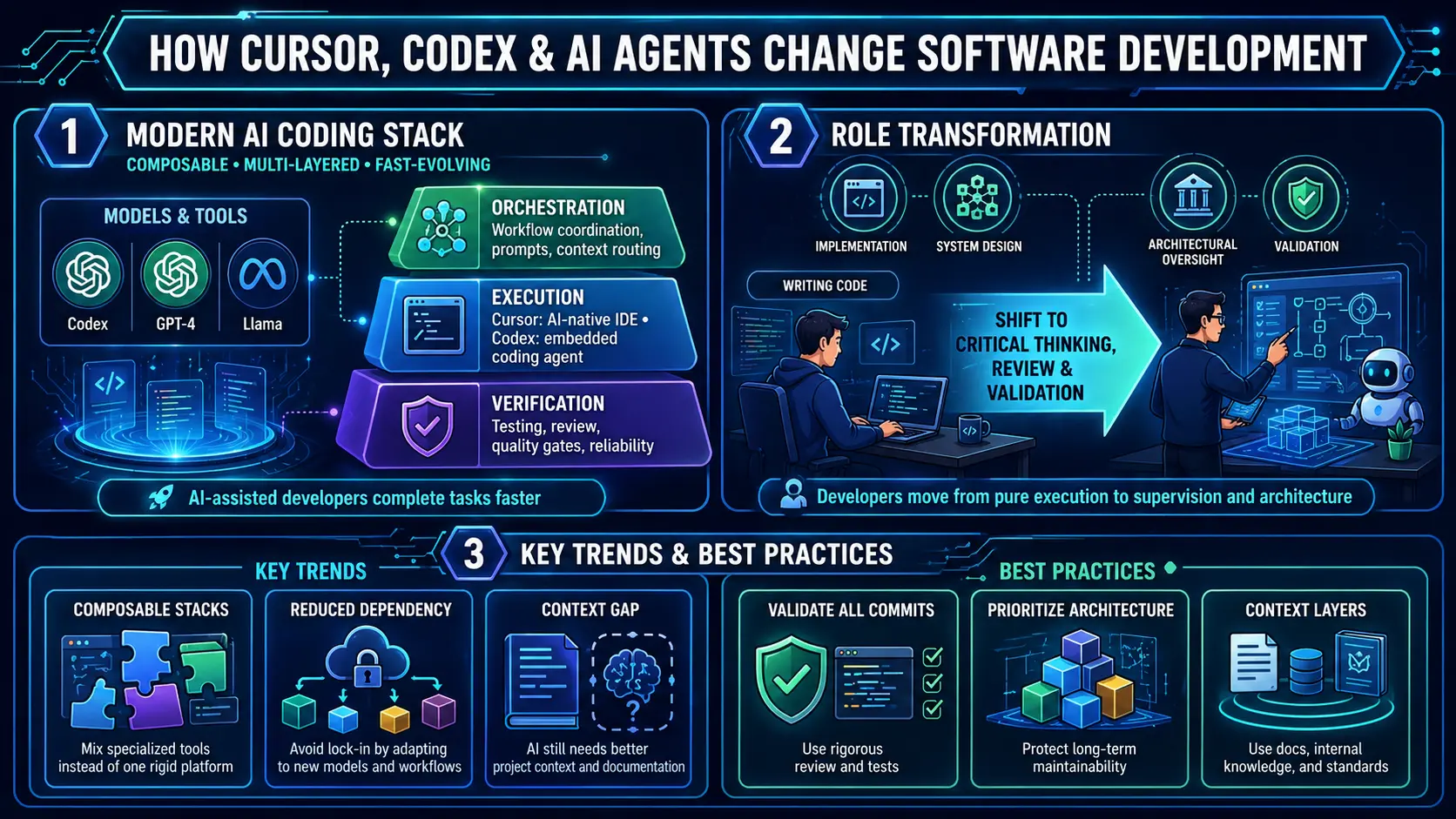
The AI coding stack is not a rigid architecture, but an emerging system of tools that developers combine to automate and accelerate different parts of the development lifecycle. In practice, stacks often center either on Cursor‑style AI‑native IDEs or Codex‑style AI agents inside conventional IDEs, then layer on top orchestration, validation, and operational tooling.
This is where generative AI integration becomes part of the engineering workflow. AI coding assistants work best when they connect with repositories, documentation, code review, deployment pipelines, and internal engineering standards instead of operating as isolated tools.
Key characteristics of this stack
- Multi‑layered rather than all‑in‑one: Cursor and Codex provide strong execution layers, but teams still need orchestration and verification tools around them.
- Built on multiple AI models: Cursor and Codex plug into broader LLM ecosystems, not isolated stacks.
- Rapidly evolving without standardization: New tools and agents appear frequently, often competing with or extending Cursor‑ and Codex‑style workflows.
- Focused on augmentation, not full automation: Neither Cursor nor Codex replaces developers; they amplify how they write, refactor, and review code.
Core Layers of the AI Development Stack: Orchestration, Execution, and Verification
To make sense of the ecosystem, many practitioners model the AI coding stack in three functional layers. Cursor and Codex sit primarily in the execution layer, but their design choices shape how the full stack is built.
| Layer | Role (Cursor vs. Codex focus) | Strengths | Key challenges |
|---|---|---|---|
| Orchestration | Manages prompts, workflows, and tool coordination. | Centralized control, workflow automation | Often lacks deep project-wide context |
| Execution | Cursor: AI-native IDE with multi-file editing and agent-style workflows. Codex: AI-assisted line-by-line completion in IDEs and agents. |
Cursor: project-wide refactoring; Codex: fast, incremental completion |
Variable quality and style |
| Verification | Validates accuracy, security, and standards for AI-generated code from Cursor and Codex. | Improves trust and reliability | Validation tooling is still maturing |
Together, these layers form a flexible stack that can be tuned to different team sizes, domains, and risk profiles, with Cursor and Codex acting as its core execution engines.
Why AI Coding Tools Are Moving Toward Composable Development Workflows?
A key trend is the move toward composition over consolidation. Teams now choose between:
- Cursor‑style all‑in‑one AI‑IDEs, which bundle prompting, editing, and some orchestration.
- Codex‑style modular agents, which plug into existing IDEs and git workflows.
This composability brings flexibility:
- Freedom to mix Cursor‑style depth with Codex‑style ubiquity.
- Easier adaptation to new models and workflows.
- Reduced dependency on a single vendor.
As teams combine AI-native IDEs, coding agents, test tools, and internal documentation systems, interoperability becomes a major concern. This is why standards such as Model Context Protocol matter: they help connect tools, context, and workflows without forcing teams into one closed AI development environment.
But it also introduces trade‑offs
- Integration complexity when combining Cursor, Codex, and other AI tools.
- Fragmented workflows if tools don’t share state.
- Higher cognitive load in choosing and managing tooling.
Cursor vs Codex : How AI Coding Assistants Fit Into Modern Developer Workflows?
The rapid growth of AI tools makes Cursor and Codex just two nodes in a broader ecosystem. Cursor leans toward project-wide AI-driven workflows, with built-in refactoring and agent-style execution. Cursor’s own documentation positions it as an AI-first code editor that helps developers understand codebases, make edits, and review changes inside the coding environment.
Codex takes a different route. OpenAI’s Codex documentation describes it as a coding agent that can generate code, understand unfamiliar codebases, and review code for bugs or edge cases. This makes Codex more aligned with embedded agent workflows, while Cursor is closer to an AI-native IDE experience.
Common issues teams face when adopting either tool
- Too many tools solving similar problems (e.g., multiple AI assistants for the same IDE).
- Lack of interoperability between Cursor, Codex, and third‑party security or test‑generation tools.
- Risk of over‑dependence on a single stack, whether Cursor‑centric or Codex‑centric.
Treating Cursor and Codex as entry points into a coherent AI stack, rather than standalone solutions, helps teams avoid fragmentation and lock‑in.
Why Cursor and Codex Still Need Better Codebase Context?
Despite their capabilities, neither Cursor nor Codex deeply understands large, multi‑service codebases by default. Both can generate functional code in isolation but may misalign with existing architecture, legacy patterns, or internal systems.
For larger engineering teams, this is why context retrieval becomes part of the AI coding workflow. Internal documentation, past tickets, API references, architecture notes, and reusable code patterns can be organized through vector databases so AI tools can retrieve more relevant project knowledge before generating or refactoring code.
OpenAI’s Codex guide also reflects this context need: Codex can read project-specific AGENTS.md files before work begins, helping teams define repository-level instructions and expectations for the agent.
Common issues include
- Misalignment with service boundaries or internal frameworks.
- Inconsistent coding patterns across AI‑assisted and legacy code.
- Poor integration with internal auth, logging, and monitoring layers.
Teams that pair Cursor and Codex with RAG‑style context layers and clear architectural guidelines reduce these risks while preserving the tools’ speed advantages.
AI Code Quality: Why Faster Development Still Needs Human Review?
Cursor and Codex have accelerated feature development, but they also shift the bottleneck from writing code to reviewing and validating it. GitHub’s Copilot code review documentation shows how AI can review code and suggest changes, but this should support—not replace—human review for architecture, security, and business logic. Developers spend less time on boilerplate and more time on:
- Reviewing AI‑generated code for correctness and style.
- Debugging subtle issues introduced by automated refactors.
- Ensuring long‑term maintainability and architectural consistency.
What’s improving
- Faster iteration and prototyping around Cursor and Codex.
- Rapid generation of tests, docs, and scaffolding.
GitHub’s code quality research suggests AI-assisted code can perform well in controlled settings, but production teams still need review gates, tests, and architecture checks before merging AI-generated changes.
What requires more attention?
- Code‑quality gates for AI‑assisted commits.
- Human‑driven validation of architecture and business logic.
How AI Coding Agents Are Changing the Developer Role?
Cursor and Codex are reshaping what developers do. The role is evolving from writing code to guiding AI, reviewing outputs, and enforcing architectural integrity.
Key shifts include
- From coding → to supervising Cursor and Codex outputs and curating prompts.
- From implementation → to system design and architectural decisions.
- From execution → to validation, security review, and long‑term maintainability.
This evolution places greater emphasis on critical thinking, cross‑system understanding, and communication skills that AI enhances but cannot replicate.
This is also why strong full-stack development knowledge still matters. Developers need to understand frontend behavior, backend logic, APIs, databases, deployment environments, and user flows before they can safely approve AI-generated code.
Enterprise AI Coding Tools: Limits of Cursor, Codex, and Agentic Development
While Cursor and Codex are powerful, they are not yet plug‑and‑play for complex enterprise environments. Common limitations include:
- Inconsistent output quality across prompts and contexts.
- Limited debugging support when AI‑generated code fails in edge cases.
- Weak understanding of large, distributed systems.
- Lack of collaboration between different AI tools.
These gaps highlight the need for human oversight, structured workflows, and robust validation pipelines around Cursor and Codex‑assisted code. In production web app development, the risk is rarely just bad syntax. The larger concern is whether AI-generated code fits the product architecture, user permissions, data flows, third-party integrations, monitoring setup, and long-term maintenance plan.
Best Practices for Adopting AI Coding Tools in Software Teams
For organizations, adopting Cursor and Codex is not just about technology; it’s about strategy and integration.
Recommended approach
- Build a cohesive stack around Cursor and Codex, starting with a small, well‑defined use case (e.g., internal tooling or a green‑field microservice).
- Prioritize code validation and testing for AI‑generated commits.
- Provide Cursor and Codex with better context via documentation, architecture blueprints, and internal knowledge bases.
- Focus on long‑term maintainability, ensuring AI‑assisted code follows consistent patterns and is well-documented.
For enterprise teams, adoption should also account for deployment infrastructure, monitoring, rollback planning, access controls, and environment reliability. RedBlink’s cloud computing services can support the operational side of AI-assisted software delivery when teams move from local experiments to production systems.
What to avoid
- Over‑reliance on the Cursor or Codex without rigorous review.
- Constant switching between Cursor, Codex, and other AI tools without clear integration rules.
- Ignoring architectural consistency and tech‑debt patterns.
The Future of AI in Software Development: From Coding Assistants to Agentic Workflows
The future of the AI coding stack will likely see:
- Greater standardization in foundational layers (orchestration, verification), especially for teams using Cursor and Codex.
- Continued fragmentation in the execution layer, as new models and agents compete with Cursor‑style and Codex‑style tools.
The most realistic outcome is a hybrid model: foundational layers stabilize and become more interoperable, while Cursor and Codex‑style execution tools remain fast‑moving and competitive. Teams that treat Cursor and Codex as components of a designed stack, rather than silver bullets, will be best positioned to leverage them responsibly.
Final Thoughts: Building Reliable AI-Assisted Software Development Workflows
The AI coding stack built around tools like Cursor and Codex represents a major shift in how developers work. It brings speed, automation, and new possibilities, but also complexity, fragmentation, and new risks around quality and context. AI is not replacing developers; it is redefining their role, with people increasingly focused on architecture, validation, and strategy.
RedBlink helps organizations build custom AI solutions and production-ready LLM applications by combining architecture planning, integration, validation, and ongoing optimization. If your team is evaluating Cursor, Codex, AI agents, or broader AI-assisted development workflows, our AI consulting services can help turn experimentation into a reliable production strategy.
If your team is still aligning on terms like LLMs, AI agents, RAG, context windows, embeddings, or model orchestration, this AI concepts vocabulary can help create a shared baseline before choosing tools or workflows.
FAQs About AI Coding Tools, Cursor, Codex, and Developer Workflows
How do AI code assistants differ from classic IDE IntelliSense?
AI code assistants (e.g., GitHub Copilot, Cursor, JetBrains AI Assistant) use LLMs to generate full functions, refactor code, and create tests or docs from natural-language prompts. IntelliSense mainly offers syntax-aware autocomplete and basic suggestions without deep project understanding.
When should teams choose an AI‑native IDE vs a plugin‑based assistant?
AI-native IDEs (e.g., Cursor, Windsurf) are best for deep, AI-first workflows like multi-file edits and agent-style coding. Plugin-based tools (e.g., GitHub Copilot) are better for lightweight adoption within existing IDEs.
How can AI help with debugging and log analysis?
AI tools analyze logs, stack traces, and errors to suggest root causes and fixes. They speed up debugging but work best alongside traditional debugging tools.
How do AI tools for test generation fit into the SDLC?
AI generates unit tests, mocks, and basic integration tests from code or prompts. They help improve coverage, but should be combined with human-written tests for critical business logic.
What role do AI‑based architecture assistants play in early‑stage design?
They convert requirements into draft system designs, APIs, and data flows. These outputs help exploration, but still need validation from engineers.
How does RedBlink approach AI‑driven software development?
RedBlink builds production-ready AI solutions by combining system design, integration, and optimization. The focus is on scalable, business-aligned AI systems.