

Last Updated on July 10, 2026
Claude Code has “code” in the name, so it is easy to assume it belongs only to engineers. That is no longer true. Product managers, marketers, analysts, founders, researchers, consultants, and operations teams are starting to use Claude Code for work that has very little to do with writing software.
The shift is simple: Claude Code is not just a coding assistant. It is an agentic work environment that can read files, create files, organize folders, run approved commands, and work across a project on your computer. For non-technical people, that makes it useful for research, content operations, spreadsheet cleanup, competitive analysis, reporting, documentation, and repeatable workflows.
Claude Code for non-technical people is best understood as a local AI work partner. Instead of pasting information into a chatbot and copying the answer back out, you point Claude Code at a folder, explain the outcome you want, review its plan, approve safe actions, and let it create or update real files.
Key Takeaways
- Claude Code is useful for non-coders because it can work with folders, documents, spreadsheets, scripts, and project context directly.
- The best beginner use cases are local, reversible, and self-contained: research folders, reports, content audits, data cleanup, documentation, and personal workflow automation.
- Claude Code is different from Claude chat because your files can act as durable context, and outputs can be saved as normal files instead of disappearing inside a chat thread.
- Non-technical teams still need safety rules: review commands, avoid sensitive systems, do not approve actions you do not understand, and ask engineers before production changes.
- For coding-agent workflows, tools like CodeConductor Harmony can help Claude Code and other MCP-compatible agents avoid repeatedly rediscovering the same codebase context.
What Is Claude Code?
Anthropic describes Claude Code as an agentic coding tool that reads your codebase, edits files, runs commands, and integrates with development tools. It is available in the terminal, IDEs, desktop app, and browser.
That sounds developer-heavy, but the important part for non-technical people is not the word “coding.” It is the ability to work with files and project context. Claude Code can operate inside a folder that contains documents, CSVs, notes, PDFs, markdown files, reports, screenshots, and lightweight scripts. You can ask it to inspect what is there, propose a plan, create new files, clean messy information, and save the results back into the same workspace.
Product Talk frames this well: Claude Code is different from browser-based Claude because your local files can act as memory and context. The article’s competitive analysis example shows why this matters. Instead of repeatedly uploading documents and copying answers between chats, Claude Code can work inside a project folder where competitor lists, product notes, research files, and output tables all live together.
For RedBlink readers, the important takeaway is this: Claude Code is part of a larger move toward agentic AI workflows. If you want a broader foundation on how AI agents plan and act, RedBlink’s guide to Cursor, Codex, and AI agents in software development explains how these tools are changing the way work gets planned, generated, reviewed, and improved.
Why Non-Technical People Are Suddenly Talking About Claude Code
The discussion is getting louder because Claude Code solves a problem that normal AI chat still creates: the copy-paste loop.
In a browser chat, you often upload a file, ask for analysis, copy the output into a document, start another chat, upload again, paste context again, and hope the model remembers what matters. Claude Code changes the workflow. You can create a project folder and let the folder become the workspace. Notes, prompts, inputs, outputs, and reusable instructions can stay there.
That is why non-engineers are experimenting with it. Lenny’s Newsletter collected examples from non-technical users, including file organization, image improvement, domain brainstorming, lead research, and spreadsheet-based tasks. Every has highlighted everyday workflows such as expense trackers, content dataset analysis, support research across technical codebases, and marketing content based on recent product changes.
The same theme appears in community discussions. A Reddit thread asking about non-coding benefits of Claude Code includes people exploring personal apps, custom agents, and non-coding workflows. On LinkedIn, Allie K. Miller called Claude Code underused by non-engineers and pointed to the biggest adoption blockers: terminal friction and examples that are either too technical or too trivial.
That last point matters. Non-technical teams do not need another demo where an AI agent builds a toy app. They need practical workflows that make real business work easier.
Claude Code vs Claude Chat: The Practical Difference
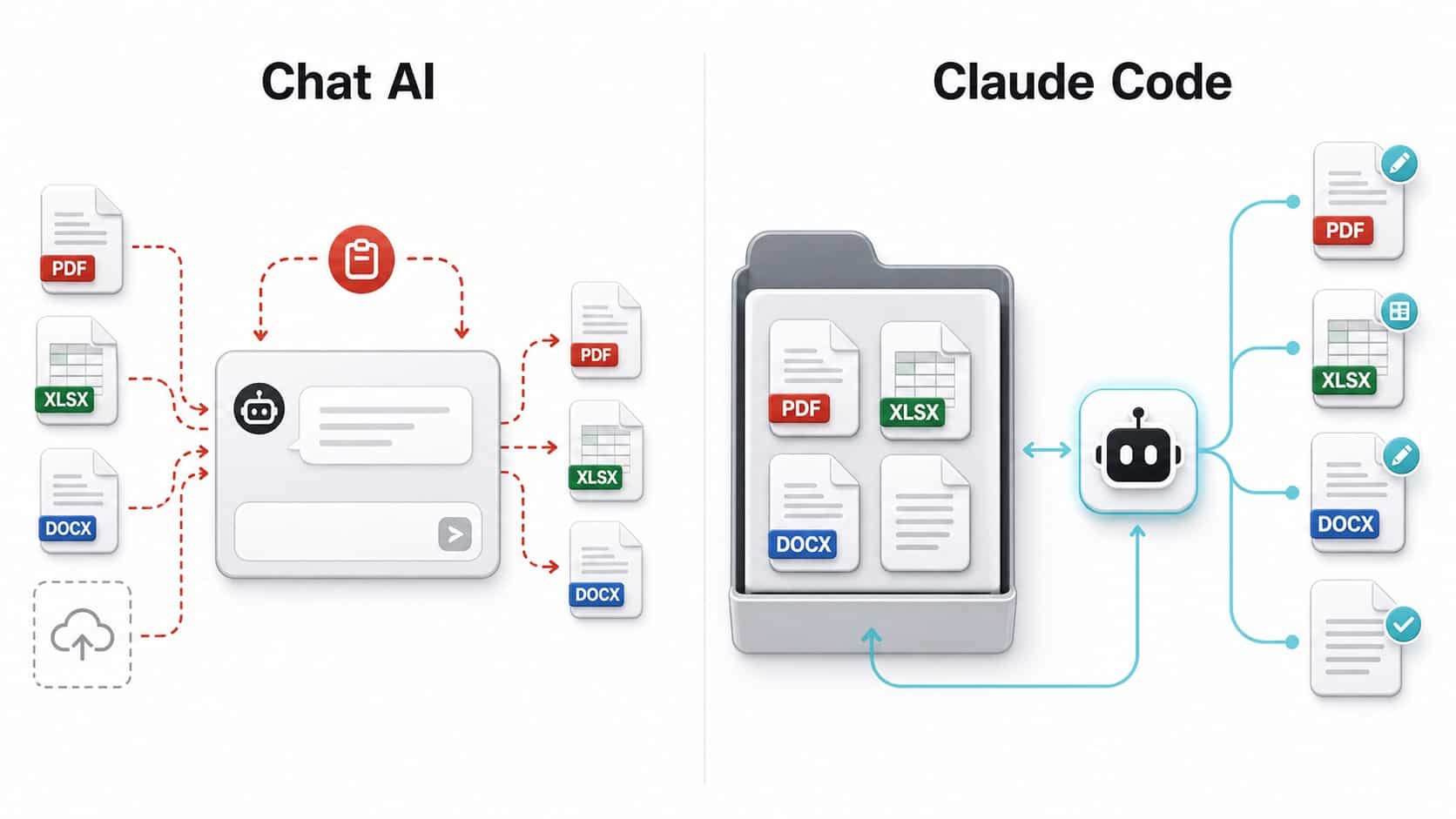
Claude chat is excellent for conversation, brainstorming, summarization, and one-off analysis. Claude Code is better when the work needs files, repeatability, local context, and saved outputs.
| Need | Claude Chat | Claude Code |
|---|---|---|
| Quick question or brainstorm | Usually best | Useful, but often more setup than needed |
| Analyze a folder of files | Requires uploads and manual context | Works directly inside the folder |
| Create multiple output files | You copy results manually | Can create and update files directly |
| Repeat the same workflow later | You recreate the prompt or project setup | You can save instructions, commands, and files locally |
| Work with project memory | Mostly chat or project based | Files, folders, markdown notes, commands, and agents can act as memory |
| Safety for non-technical users | Lower operational risk | More powerful, so permissions and review matter more |
A simple rule helps: use Claude chat when the answer is the artifact. Use Claude Code when the folder is the artifact.
Best Claude Code Use Cases for Non-Coders
The best beginner use cases have three traits: the files are local, the output is easy to inspect, and mistakes are reversible. Start with work where Claude Code can save time without touching systems that other people depend on.
1. Competitive Research
Create a folder with your product notes, competitor list, pricing pages, and positioning criteria. Ask Claude Code to build one markdown file per competitor, then generate a comparison table. Later, when a new competitor appears, add it to the list and rerun the workflow.
This is one of the strongest examples from the Product Talk article because it shows the compounding value of local context. You are not just getting one answer. You are building a reusable research system.
2. Content Audits and Editorial Planning
Marketing teams can export URLs, titles, metadata, traffic notes, and article briefs into a folder. Claude Code can group articles by topic, identify duplicate angles, draft refresh recommendations, and create a content calendar.
This pairs naturally with RedBlink’s AI AI SEO work. If your team is planning content around AI tools, agents, or workflow automation, a local Claude Code project can keep SERPs, AI Overviews & LLMs notes, outlines, drafts, and publishing checklists organized.
3. Spreadsheet Cleanup
Claude Code can help inspect CSV files, normalize columns, remove duplicates, create summary tables, and produce cleaned output files. This is useful for lead lists, survey exports, customer feedback, event registrations, and content inventories.
Non-technical users should still review the cleaned file and keep the original unchanged. Ask Claude Code to write outputs to a new file such as cleaned-leads.csv rather than overwriting the source file.
4. Reports and Briefs
Consultants, researchers, and operations teams can place meeting notes, transcripts, raw research, and spreadsheets in one folder. Claude Code can create a structured brief, highlight missing information, and generate follow-up questions.
The value is not only summarization. The value is that Claude Code can preserve the source files, create new files, and leave a visible trail of how the work was organized.
5. Personal Workflow Automation
Claude Code can help create small local utilities for repetitive personal tasks: renaming files, sorting downloads, creating folder templates, generating markdown reports, or converting messy notes into a standard format.
This is where non-technical users should move slowly. Ask Claude Code to explain what it plans to do before approving commands, and test on a copied folder first.
6. Product and Customer Support Research
Support and product teams sometimes need to understand technical changes without asking engineers for every answer. Every’s article gives examples of non-technical team members using Claude Code to research technical codebases for customer support questions and draft marketing copy from recent code changes.
This can be very useful, but it needs boundaries. Claude Code can help explain files and changes. It should not ship changes to production, modify sensitive settings, or make claims to customers without review.
For Claude Code Power Users
Stop making coding agents rediscover the same codebase.
CodeConductor Harmony gives MCP-compatible agents high-performance codebase memory so Claude Code, Cursor, Codex, Gemini, and other agents can retrieve focused context faster.
Where CodeConductor Harmony Fits Naturally
Most non-technical Claude Code workflows involve documents, spreadsheets, research folders, and reports. But many teams eventually use Claude Code around real software projects: asking what changed, drafting release notes, checking a feature, helping support understand an issue, or preparing product documentation from code changes.
That is where codebase memory becomes important. A coding agent can waste a lot of time searching files, reading modules, guessing relationships, and rebuilding context every time a new task starts. RedBlink’s guide to AI agent memory types explains why agents need working, long-term, semantic, episodic, and procedural memory to stay useful over time.
CodeConductor Harmony applies that memory idea specifically to codebases. It is an MCP-compatible memory layer designed to help agents retrieve compact, relevant repository context instead of repeating the same discovery steps. The Harmony page describes features such as contextual indexing, token budgeting, adaptive context expansion, repository isolation, and agent-aware context bundles.
For a non-technical product manager or support lead, the practical value is simple: when you ask Claude Code about a feature, a bug, or a release, the agent has a better chance of starting from the right code context. That does not replace engineering review, but it can reduce the number of basic context questions you need to send to developers.
How to Start with Claude Code if You Are Not Technical
Start small. Do not begin with your company’s production repository, a folder full of sensitive documents, or a task that could delete important files. Create a safe test folder with copied files and practice there.
Step 1: Pick a Low-Risk Project Folder
Choose a folder that contains copied documents, sample spreadsheets, notes, or public research. Avoid credentials, customer data, legal files, payroll exports, production code, and anything you cannot afford to expose or modify.
Step 2: Tell Claude Code What the Folder Is
Use plain language. For example:
This folder contains exported customer feedback from three surveys.
Please inspect the files, summarize what each file contains, and suggest a safe plan before changing anything.
Step 3: Ask for a Plan Before Action
This is the habit that keeps non-technical users safe. Ask Claude Code to explain the files it found, what it plans to create, and which commands it wants to run. Then approve only the steps you understand.
Before editing or running commands, explain your plan in simple language.
Do not overwrite original files.
Create new output files with clear names.
Step 4: Save Reusable Instructions
If you repeat a workflow, ask Claude Code to create a short instruction file. For example, a marketing team might save a content-audit-instructions.md file that explains how to classify posts, what metadata to check, and how to format recommendations.
Step 5: Review Outputs Like a Manager, Not a Programmer
You do not need to understand every technical detail to use Claude Code well. You do need to review whether the output makes business sense. Check samples. Compare against source files. Ask Claude Code to show assumptions. Keep originals.
Prompt Examples for Non-Technical Claude Code Users
These prompts are intentionally plain. Claude Code works better when you describe the outcome, constraints, and review process clearly.
Research Folder Prompt
Inspect this folder of research notes.
Create a file called research-summary.md with:
1. The main themes
2. Important facts with source filenames
3. Open questions
4. Recommended next steps
Do not delete or overwrite any existing file.
Spreadsheet Cleanup Prompt
Look at the CSV files in this folder.
Identify duplicate rows, inconsistent company names, missing emails, and unusual values.
Create a cleaned copy and a separate cleanup-report.md explaining what changed.
Do not edit the original files.
Content Audit Prompt
Analyze the exported blog list in this folder.
Group posts by topic, flag likely duplicate angles, and suggest refresh priorities.
Create content-audit.md and include a table with URL, topic, issue, and recommendation.
Meeting Notes Prompt
Review these meeting notes and transcripts.
Create an action-items.md file with owner, task, deadline if mentioned, dependency, and open question.
If an owner or deadline is unclear, mark it as unclear instead of guessing.
Safe Automation Prompt
I want to organize these copied files into folders by file type and date.
First explain your plan.
Then create a preview list of proposed moves.
Do not move anything until I approve the preview.
What People Are Saying in Hot Discussions
The public discussion around Claude Code has become more practical. People are no longer only asking whether it can build apps. They are asking where it fits in normal work.
On Reddit, users are discussing non-coding benefits such as custom agents, personal workflows, and simple app ideas. The useful signal is not that every idea is mature. It is that non-developers are trying to understand the CLI as a general-purpose work surface rather than a programmer-only tool.
On LinkedIn, Allie K. Miller’s post highlights the adoption gap: Claude Code is powerful, but terminal-based interfaces create resistance for business users. That matches what many teams experience internally. The tool is capable, but the examples, onboarding, and guardrails often assume an engineering audience.
The lesson for companies is straightforward: if you want non-engineers to use Claude Code, do not just give them the tool. Give them approved folders, example workflows, permission rules, and review expectations.
Safety Rules for Non-Technical Users
Claude Code is powerful because it can act on your computer. That is also why it deserves more caution than a chat window.
Anthropic’s Claude Code security guidance recommends reviewing suggested commands before approval, avoiding untrusted content, verifying changes to critical files, and using virtual machines for higher-risk scripts or external tool calls. Those are developer-oriented recommendations, but the same principles apply to non-technical users.
Use This Beginner Safety Checklist
- Work in a copied folder, not the only copy of important files.
- Ask Claude Code to explain its plan before running commands.
- Do not approve commands you do not understand.
- Do not let it overwrite original files unless you have a backup.
- Keep customer data, passwords, tokens, and private legal documents out of beginner experiments.
- Use read-only analysis before file edits.
- Ask for a preview before moving, deleting, renaming, or modifying files.
- Do not deploy software, change infrastructure, or modify production systems without engineering review.
- For company use, ask IT or engineering to define approved folders and permission settings.
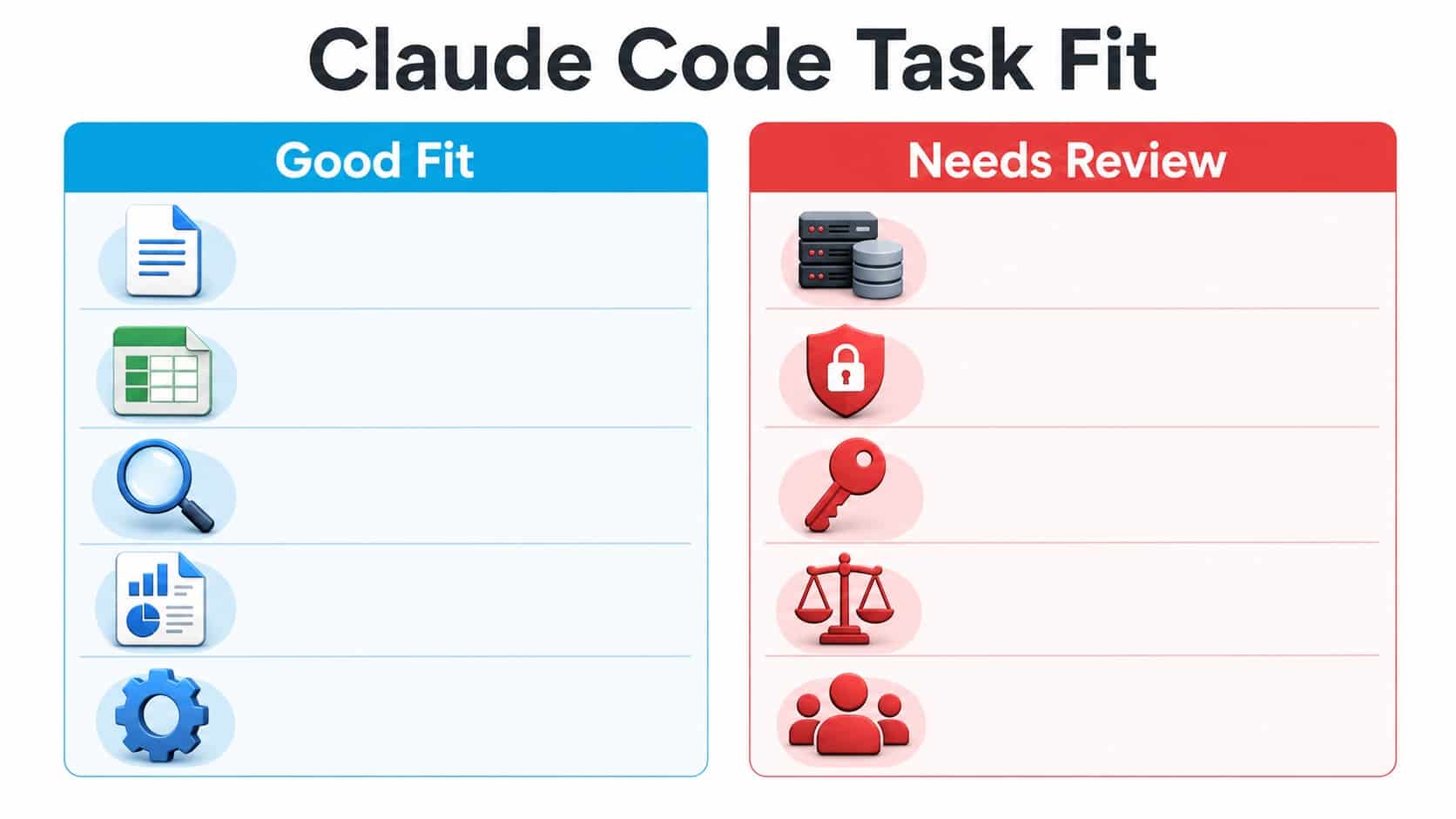
Tasks That Are a Good Fit vs Tasks That Need Review
| Good Fit for Non-Technical Users | Needs Technical or Business Review |
|---|---|
| Summarizing local research folders | Changing production code or live systems |
| Creating markdown reports from notes | Handling credentials, API keys, or secrets |
| Cleaning copied CSV exports | Processing sensitive customer or employee data |
| Generating content briefs and outlines | Making legal, financial, or compliance decisions |
| Organizing copied files into folders | Deleting files, changing permissions, or modifying shared drives |
| Explaining a codebase for product or support context | Shipping code, merging pull requests, or updating customer-facing systems |
How Teams Can Roll Out Claude Code to Non-Engineers
Claude Code adoption should feel like workflow enablement, not a technical rite of passage. A practical rollout includes:
- Starter folders: Pre-approved sample projects where users can practice safely.
- Reusable prompts: Templates for research, spreadsheet cleanup, meeting notes, content audits, and report generation.
- Permission rules: Clear boundaries on what Claude Code may read, write, run, or change.
- Review patterns: Require previews before file moves, deletions, or bulk edits.
- Escalation paths: Define when to ask engineering, security, legal, or data teams for help.
- Shared learning: Maintain a small internal library of successful workflows, prompts, and examples.
This is also where the broader Model Context Protocol ecosystem matters. MCP can connect AI tools to external systems, but access must be governed. More connectivity should come with clearer controls, not looser habits.
If your team is comparing setup patterns around Claude Code, RedBlink’s overview of GStack as an open-source Claude Code setup is a useful companion read. It looks at a more developer-oriented configuration, while this guide focuses on how non-engineers can use Claude Code safely for everyday business workflows.
When Claude Code Is Not the Right Tool
Claude Code is not always the best starting point. Use a normal AI chat when you only need a quick answer, a brainstorm, or a simple rewrite. Use a no-code tool when you need a polished interface for a repetitive business process. Use an engineer when the task touches production infrastructure, security-sensitive data, or customer-facing systems.
RedBlink’s guide to building no-code AI agents is useful if your goal is a shared workflow that many non-technical users can run through a browser interface. Claude Code is excellent for local, flexible, power-user workflows. It is not automatically the right user interface for every team.
Final Thoughts
Claude Code matters for non-technical people because it changes the shape of AI work. Instead of treating the chatbot as the workplace, it lets your project folder become the workplace. Files can act as context. Outputs can live where you need them. Instructions can be reused. Workflows can compound.
The opportunity is real, but it should be approached with good judgement. Start with copied files. Ask for plans. Approve carefully. Keep sensitive data out of early experiments. Bring in technical review when the work touches systems other people depend on.
For non-engineers, the goal is not to become a programmer. The goal is to become fluent enough with agentic tools to turn messy files, repeated steps, and scattered context into organized work.
Frequently Asked Questions
Can non-technical people use Claude Code?
Yes. Non-technical people can use Claude Code for local file work, research, reporting, spreadsheet cleanup, content planning, documentation, and repeatable workflows. The key is to start with safe folders and review actions before approving them.
Is Claude Code only for coding?
No. Claude Code was built for software development, but many of its strengths apply to non-coding work: reading folders, creating files, organizing information, running approved commands, and preserving project context.
How is Claude Code different from Claude chat?
Claude chat is best for conversation and one-off tasks. Claude Code is better when work lives in files and folders, needs multiple steps, or should produce saved outputs that remain on your computer.
What can non-coders do with Claude Code?
Non-coders can use Claude Code to summarize research folders, clean copied spreadsheets, create content audits, organize documents, draft reports, analyze feedback, generate meeting action items, and build small local workflow helpers.
Is Claude Code safe for business users?
Claude Code can be safe when used with guardrails. Business users should work in copied folders, avoid sensitive data, review commands before approval, keep originals, and involve technical teams before touching production systems.
Do I need to know terminal commands to use Claude Code?
You need basic comfort launching Claude Code and approving actions, but you do not need to be a software engineer. The main skill is learning how to describe the outcome, set boundaries, and review the proposed plan.
Should companies train non-engineers on Claude Code?
Yes, if they provide safe workflows, permission rules, examples, and escalation paths. Claude Code can help non-engineers work faster, but company rollout should include governance and review expectations.
Where does Harmony fit with Claude Code?
CodeConductor Harmony fits when Claude Code is used around software repositories. It gives MCP-compatible coding agents persistent codebase memory so they can retrieve relevant repository context instead of repeatedly searching from scratch.